Ford Galaxy Radio Code Generator by Serial Number
Is your family MPV stereo asking for a security PIN after a battery swap or maintenance work? Recovering your Ford Galaxy radio code is fast, reliable, and fully guaranteed. Get your original factory 4-digit code online in minutes.
Our online system handles all factory-installed stereos, including Ford Galaxy 6000 CD radio code units, Sony MP3 systems, TravelPilot navigation screens, as well as Ford Galaxy M serial radio code and Ford Galaxy V serial radio code databases.
Unlock Your Ford Galaxy Radio
Enter your Ford Galaxy radio serial number below:
How to get your Ford Galaxy radio code by serial number
To generate your unlock code, you need the unique serial number attached to your stereo. For most Ford Galaxy models, you can retrieve this code directly from the screen using a key shortcut. If that doesn’t display the serial, removing the unit from the center console reveals the printed sticker on the side or rear casing.
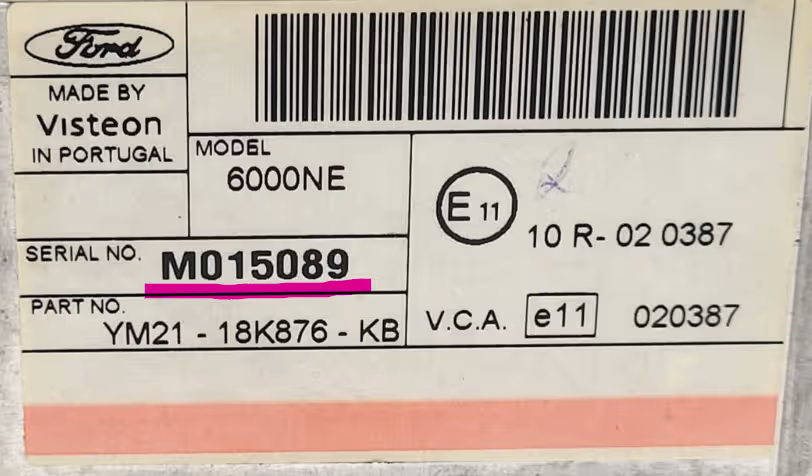
Example of a Ford stereo showing a M series serial number on screen.
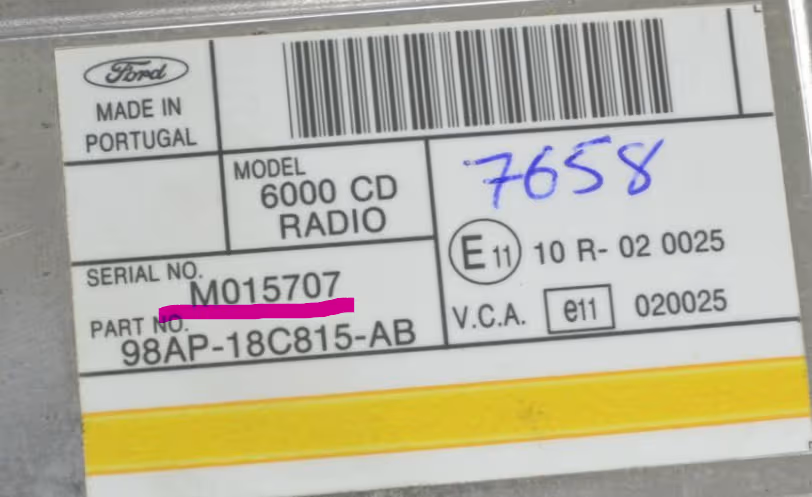
Example of a Ford radio removed showing the serial label on the metal casing.
Method 1: Screen Shortcut (1 & 6)
Turn on your Ford Galaxy radio, then press and hold preset buttons 1 and 6 together for a few seconds. Software data will scroll through, ending with your serial code (e.g. V123456).
Method 2: Screen Shortcut (2 & 6)
On older Ford Galaxy units or 5000/6000 RDS cassette/CD systems, press and hold buttons 2 and 6 to display the M or V series serial number on screen.
Method 3: Rear Casing Label
If the screen button shortcuts do not work, use Ford radio extraction keys in the 4 corner slots. Pull the unit forward to view the white manufacturer sticker containing the serial number.
Understanding Ford Galaxy V Serial and M Serial radio codes
When requesting a Ford Galaxy radio code by serial number, your serial prefix depends on the production year and stereo version installed:
Ford Galaxy V Serial Radio Code
Found on most Mk2 facelift and Mk3 Ford Galaxy models (2004 onwards). These serials start with letter V followed by 6 digits (e.g. V098214 or V654321).
Ford Galaxy M Serial Radio Code
Common on earlier Mk1 and Mk2 Ford Galaxy vehicles. These serials start with letter M followed by 6 digits (e.g. M123456 or M049182).
Ford Galaxy 6000 CD Radio Code
The standard square or oval CD player fitted in thousands of Ford Galaxy MPVs. Completely supported regardless of M or V serial series.
1. Turn on the car ignition and switch on the radio until
CODE or 0000 appears.2. Press button 1 repeatedly until the 1st digit of your code is shown.
3. Press button 2 for the 2nd digit, button 3 for the 3rd, and button 4 for the 4th digit.
4. Verify the 4-digit PIN on screen, then press button 5 (or 6 on some models) to submit and activate your audio system.
Supported Ford Galaxy radio models
We provide genuine factory codes for all original stereos across every generation of Ford Galaxy (Mk1, Mk2, Mk3, and Mk4):
- Ford Galaxy 6000 CD Radio
- Ford Galaxy Sony CD / MP3 / DAB
- Ford TravelPilot FX / NX Navigation
- Ford 5000 RDS / 6000 RDS
- Ford Sound 2000 & 3000 Series
- Ford Galaxy Touchscreen Navigation
Explore our dedicated code recovery pages for Ford Mondeo, Ford Focus, Ford Transit, or Ford Fiesta.
Why choose RadioCodePro for your Ford Galaxy radio code?
Skip Dealership Delays
Avoid taking your car to a main dealer, waiting for appointments, or paying expensive workshop diagnostic charges.
Instant 24/7 Delivery
Our automated server decodes your serial number instantly and sends your official PIN straight to your email.
100% Guaranteed Works
All generated PINs come directly from Ford database files. We back every order with a 100% money-back guarantee.
Ford Galaxy radio code FAQ
How do I find my Ford Galaxy radio serial number on screen?
Press and hold buttons 1 and 6 (or 2 and 6) on your Ford Galaxy radio controls simultaneously. The serial number will scroll across the screen, starting with V or M followed by 6 digits.
What is the difference between Ford Galaxy V serial and M serial radio codes?
M serial numbers belong to older Ford Galaxy models, while V serial numbers are found on mid-to-later model stereos. Both V serial and M serial radio codes can be generated instantly online using your serial number.
How do I enter the unlock code into a Ford Galaxy 6000 CD radio?
Repeatedly press button 1 for the first digit, button 2 for the second, button 3 for the third, and button 4 for the fourth digit. Once your 4-digit code is shown correctly on the screen, press button 5 to confirm.
What should I do if my Ford Galaxy radio displays WAIT or LOCKED?
If WAIT is displayed, leave the radio powered ON for 30 to 60 minutes until the countdown resets. If LOCKED appears, holding button 6 may give you final attempts, but entering incorrect codes too many times permanently locks the unit.