How To Retrieve Your VW Car Radio Code
If your Volkswagen radio is asking for a security code after a battery change, flat battery, radio replacement, or electrical repair, you can request the code online using the radio serial number.
This guide explains how to retrieve your VW car radio code, where to find the serial number, and what to check before placing your request.
Enter your VW serial number
Most Volkswagen radio serial numbers start with VWZ.
Volkswagen radio · Not a Volkswagen? Change the make
How to find your Volkswagen radio serial number
To generate the correct code, you need the serial number from your Volkswagen radio. In many cases, the radio must be gently removed from the dashboard so the label can be checked.
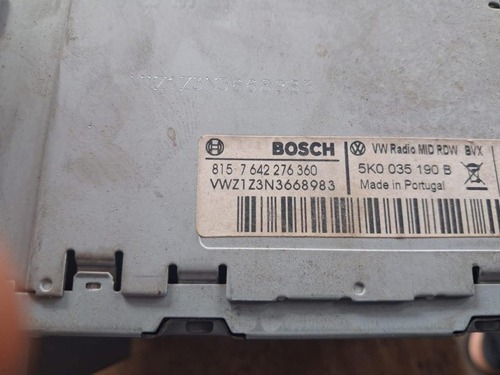
Example of a radio label where the serial number is usually printed.
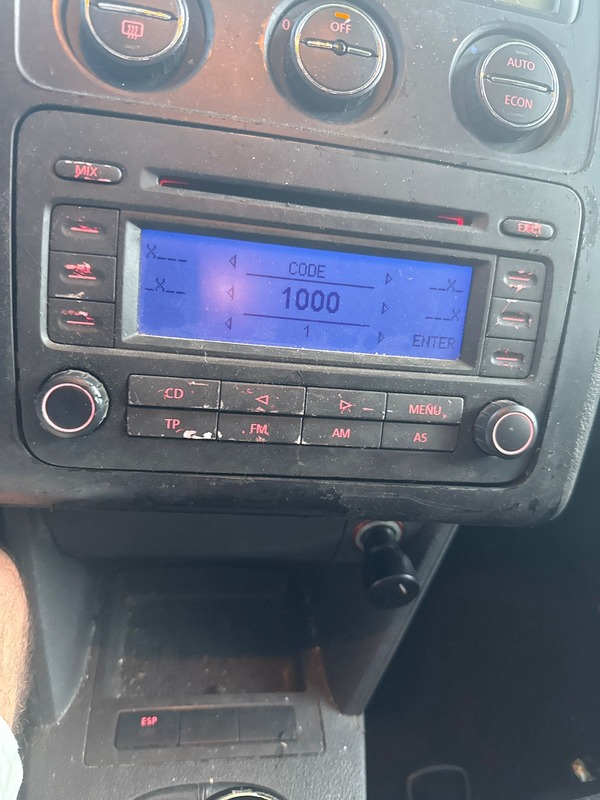
Example of a Volkswagen radio screen asking for the security code.
Check the radio label
Look for a sticker on the top, side, or back of the unit. The serial often begins with VWZ.
Use the full serial
Enter the complete serial exactly as shown. Missing characters may generate the wrong result.
Send a clear photo
If you are not sure, take a clear photo of the radio label before placing your request.
Popular Volkswagen radio code guides
Volkswagen used several factory radio and navigation units over the years. Some drivers have a simple RCD unit, while others have a larger RNS navigation system. The process is similar, but each model can have a slightly different serial label, button layout and code entry method.
Choose the Volkswagen radio model below if you want a more specific guide for your unit.
VW RCD 300 Radio Code
The RCD 300 is common in Volkswagen Golf, Passat, Touran, Polo and Caddy models. If the display shows SAFE, the code can usually be recovered from the VWZ serial number printed on the radio label.
View RCD 300 GuideVW RCD 310 Radio Code
The RCD 310 is another popular Volkswagen factory radio. It may ask for a security code after a flat battery, battery replacement or radio swap. The serial number is normally found on the unit label.
View RCD 310 GuideVW RCD 510 Radio Code
The RCD 510 touchscreen radio is used in many Volkswagen vehicles and can enter SAFE mode after power loss. Use the full VWZ serial number to request the correct radio code online.
View RCD 510 GuideVW RNS 510 Radio Code
The RNS 510 is a Volkswagen navigation and multimedia system. If it becomes locked after battery disconnection, the serial number can help recover the original security code.
View RNS 510 GuideWhy Volkswagen radios ask for a security code
Many Volkswagen factory radios include an anti-theft security system. After a battery replacement, flat battery, radio swap, or electrical interruption, the unit may enter SAFE mode and request a radio code before it can be used again.
This security feature is designed to prevent stolen radios from being reused in another vehicle. In most situations, the original code can be recovered using the serial number printed on the radio label.
Volkswagen radios are commonly manufactured by brands such as Blaupunkt, Bosch, Grundig, Panasonic, Delphi and Technisat. Many units use serial numbers beginning with VWZ, while others may have additional manufacturer references printed on the sticker.
Before requesting a code, double-check that the serial number is entered correctly. A single incorrect character can generate the wrong result. If the label is damaged or difficult to read, taking a clear photo of the sticker can help avoid mistakes.
Some Volkswagen radios may temporarily lock after multiple incorrect code attempts. In this case, the radio usually needs to remain powered on for a period of time before another attempt can be made.
How to enter the VW car radio code
After receiving the code, switch on the radio and wait for the code entry screen to appear. Use the preset buttons on the radio to enter each digit of the security code.
On many Volkswagen radios, pressing and holding the scan, seek, mode, or OK button will confirm the code entry. The exact process can vary depending on the radio model installed in the vehicle.
If the radio displays SAFE or LOCKED, avoid entering random codes repeatedly. Multiple incorrect attempts may increase the waiting time before another code can be entered.
Volkswagen models we can help with
Our online service can help with many factory radio units used across popular Volkswagen vehicles. Whether your car has an RCD 300, RCD 310, RCD 510, RNS 510 or another VW factory radio, the serial number is the most important detail for finding the correct code.
Why use RadioCodePro?
No dealer visit
Request your code online without booking an appointment or waiting at a dealership.
Simple process
Enter your serial number, complete the secure checkout, and receive the result by email.
Support included
If something looks wrong with the serial number, we can help you check the radio label.
VW car radio code FAQ
Where is the VW radio serial number located?
The serial number is usually printed on a label on the top, side, or back of the radio unit. Many Volkswagen serial numbers begin with VWZ.
Can I retrieve my VW car radio code without visiting a dealer?
Yes. In most cases, the code can be requested online using the radio serial number.
How long does it take to receive the code?
Delivery is usually fast, but some Volkswagen codes may take longer depending on server availability and verification.
What if my code does not work?
First, check that the serial number was entered correctly. If the serial is wrong or incomplete, the code may not match the radio.
What serial numbers are supported?
Many VWZ serial numbers are supported. The best way is to enter the full serial number exactly as printed on the radio label.