Ford Transit Radio Code Generator by Serial Number
If your Ford Transit or Transit Connect radio displays CODE, ENTER CODE, or LOCKED after a battery replacement or power failure, you can recover your original 4-digit unlock code online instantly.
We generate codes for all Ford Transit stereos using the serial number. Works with V Series (e.g. V062049), M Series (e.g. M123456), Z/A Series, and C7/TravelPilot models.
Get Your Transit Radio Code
Enter your Ford Transit radio serial number below:
How to find your Ford Transit radio serial number
Getting your Transit radio serial is quick. For most 6000 CD and Sony stereos, you can display the serial code directly on screen without removing the unit. If the screen method doesn’t work, pulling the unit reveals the serial label on the back.
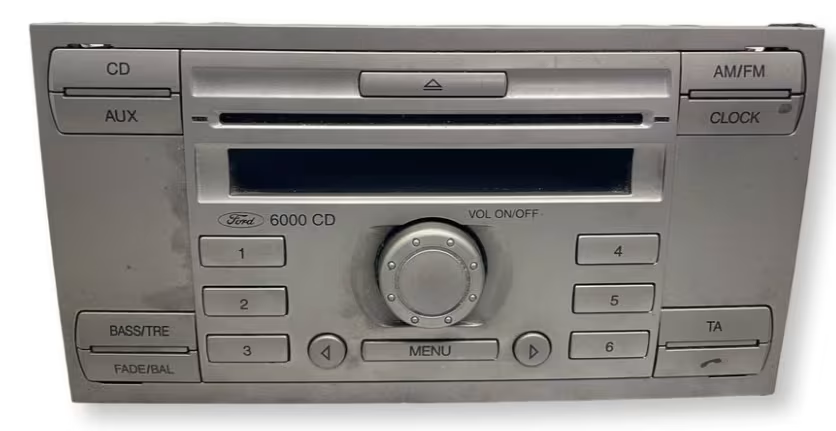
Example of a Ford radio display locked and asking for the 4-digit security code.
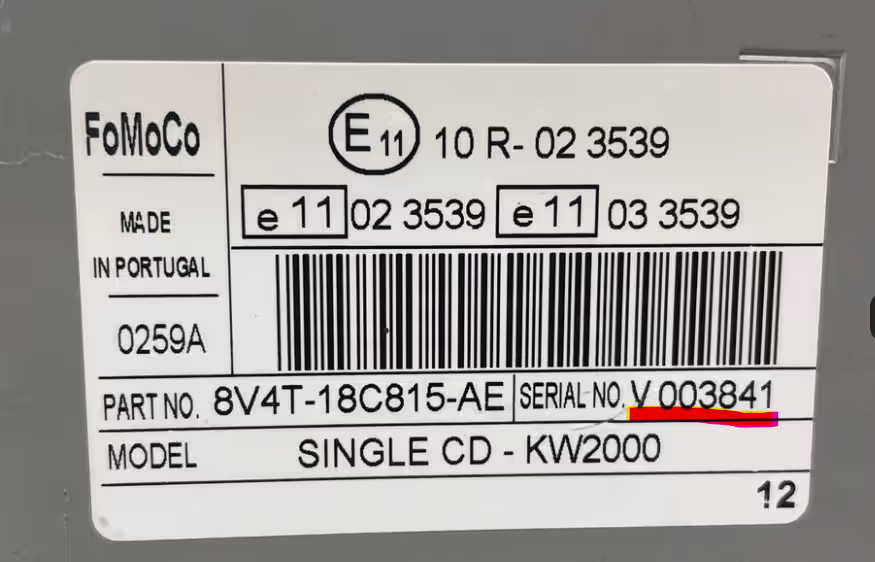
Example of a Ford radio unit removed showing the serial label on the casing.
Method 1: On-Screen (1 + 6)
Turn on the radio, press and hold buttons 1 and 6 together for 2 seconds. The display will cycle through information until a serial starting with V or M appears (e.g. V062049).
Method 2: On-Screen (2 + 6)
If 1 & 6 doesn’t show the serial, try holding buttons 2 and 6 simultaneously. This is common on older RDS units and some Sony models.
Method 3: Check Casing Sticker
If no serial appears on screen, insert radio release keys into the corner slots to slide the unit forward. The serial number is printed on a white sticker or stamped into the metal case.
Why does your Ford Transit radio lock?
Ford vehicles feature an active anti-theft security system built into the audio equipment. If electrical power to the radio is interrupted—such as when replacing the van battery, after a jump-start, or if a fuse blows—the system locks itself automatically.
This is a standard security feature to deter theft. Entering the official 4-digit key code restores full stereo function immediately. Avoid guessing randomly: entering incorrect codes multiple times will cause the radio to display WAIT or enter LOCKED mode.
Ford Transit radio models supported
Our database covers all factory-fitted audio systems across the entire Ford Transit, Transit Custom, Transit Connect, and Transit Courier ranges:
- Ford 6000 CD
- Ford Sony CD & MP3
- Ford TravelPilot / Navigation
- Ford 5000 RDS / 4000 RDS
- Ford 1500 RDS / 3000 RDS
- Ford Audio System (MK7 & MK8)
- Transit Custom Audio Units
- Transit Connect Factory Units
Check our dedicated guides for Ford Fiesta, Ford Mondeo, Ford 6000 CD or Ford Sony Radios.
Common Ford Transit serial formats
Depending on the year and specific unit fitted in your Transit van, your serial number will follow one of these standard formats:
V Series (e.g. V062049)
Most common on 2004-2015 Transit 6000 CD and Sony stereos.
M Series (e.g. M123456)
Standard on older Transit vans and 5000/6000 RDS units.
Z & A Series (e.g. Z019284)
Fitted to newer MK7/MK8 Transit models and custom units.
1. Turn on the radio until display shows
CODE or 0000.2. Press button 1 repeatedly until the first digit appears.
3. Press button 2 for the second digit, button 3 for the third, and button 4 for the fourth.
4. Press button 5 (or 6 on some models) to submit and unlock your radio.
Why choose RadioCodePro?
No Main Dealer Trips
Skip expensive dealership fees and avoid taking time out of your working day to unlock your van’s stereo.
Fast Email Delivery
Enter your serial, place your request safely online, and receive your guaranteed code direct to your inbox.
Expert Support
If you’re having trouble locating or reading your serial label, send us a photo and our technical team will help.
Ford Transit radio code FAQ
How do I get the radio code for my Ford Transit on-screen?
Press and hold buttons 1 and 6 simultaneously for a few seconds. The screen will scroll through information and show your serial number, typically starting with V, M, Z or A followed by 6 digits.
Where is the serial number located if it doesn’t show on screen?
If the screen shortcut doesn’t work or for units like TravelPilot, you must remove the radio using release keys. The serial number is printed on a white sticker or engraved on the metal casing on the back/side.
What does a Ford Transit radio serial number look like?
Common Transit serials start with V or M followed by 6 digits (e.g. V062049, M123456). Newer models may use Z or A prefixes, while navigation units use C7 or BP prefixes.
How do I enter the unlock code into a Ford Transit radio?
Use preset buttons 1 to 4 to enter each digit of your 4-digit security PIN. Repeatedly press button 1 for the first digit, button 2 for the second, and so on. Press button 5 (or 6 on some models) to submit.
What happens if my Ford Transit radio displays LOCKED or WAIT?
If ‘WAIT’ is displayed, leave the radio powered ON for up to 30-60 minutes to reset the timer. If ‘LOCKED 10’ appears, hold button 6 to get additional attempts. If ‘LOCKED 13’ appears, the unit has reached its maximum attempts.