How To Retrieve Your Dodge Car Radio Code
If your Dodge radio is showing “CODE” or “LOC” after a battery change, flat battery, radio swap, or electrical repair, you can request the unlock code online using the radio serial number.
This guide explains how to retrieve your Dodge car radio code, where to find the serial number on the unit, and what to check before placing your request.
Enter your Dodge serial number
Most Dodge radio serial numbers start with T and are 14 characters long.
Dodge radio · Not a Dodge? Change the make
How to find your Dodge radio serial number
To generate the correct code, you need the serial number printed on your Dodge radio. On older models, the unit usually has to be pulled out of the dash to check the label on the casing. On newer Uconnect radios, the serial number can sometimes be read straight from the screen, under a menu such as “System Info” or “About Radio”.
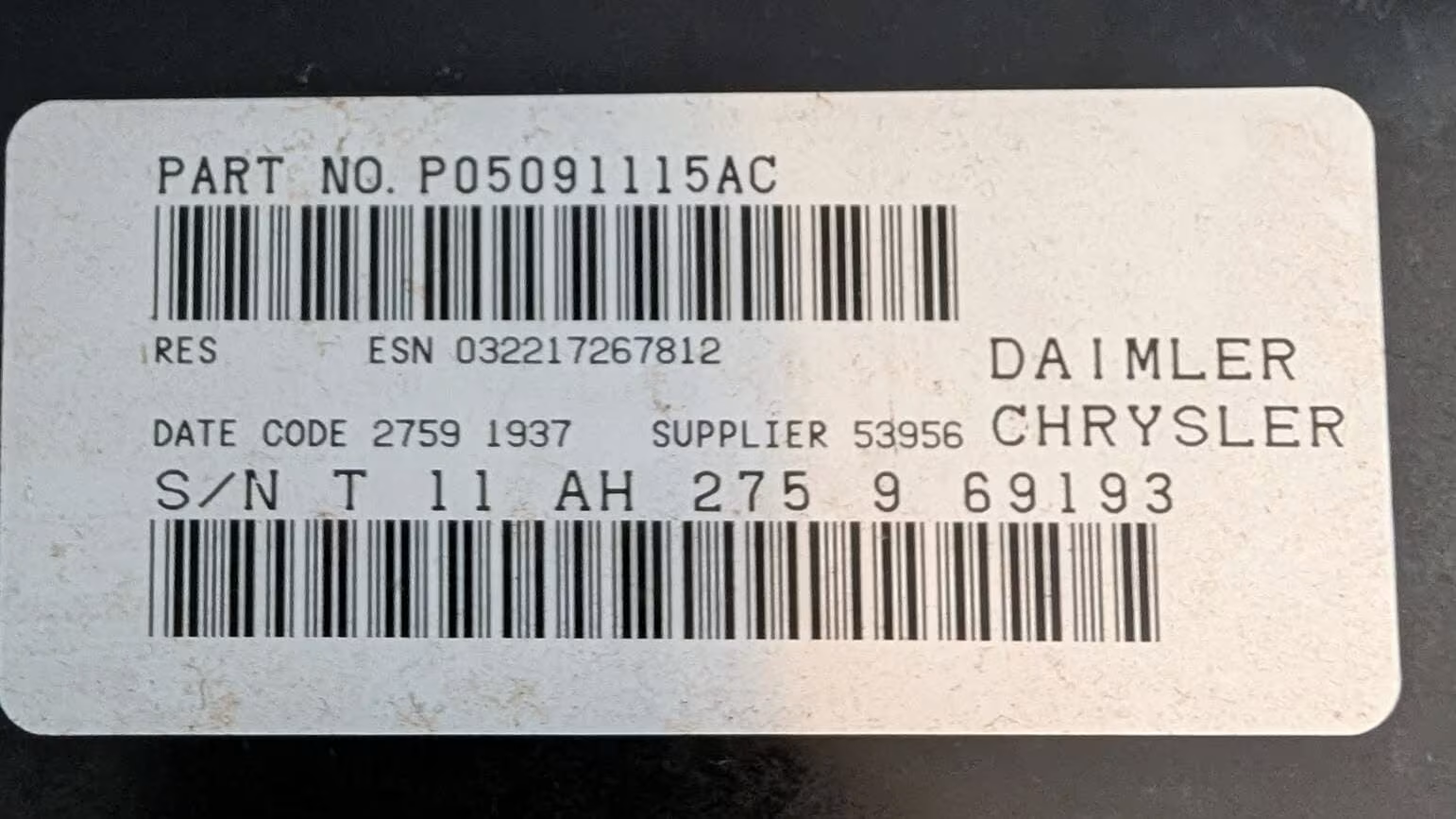
Example of a Dodge radio label where the serial number is printed.
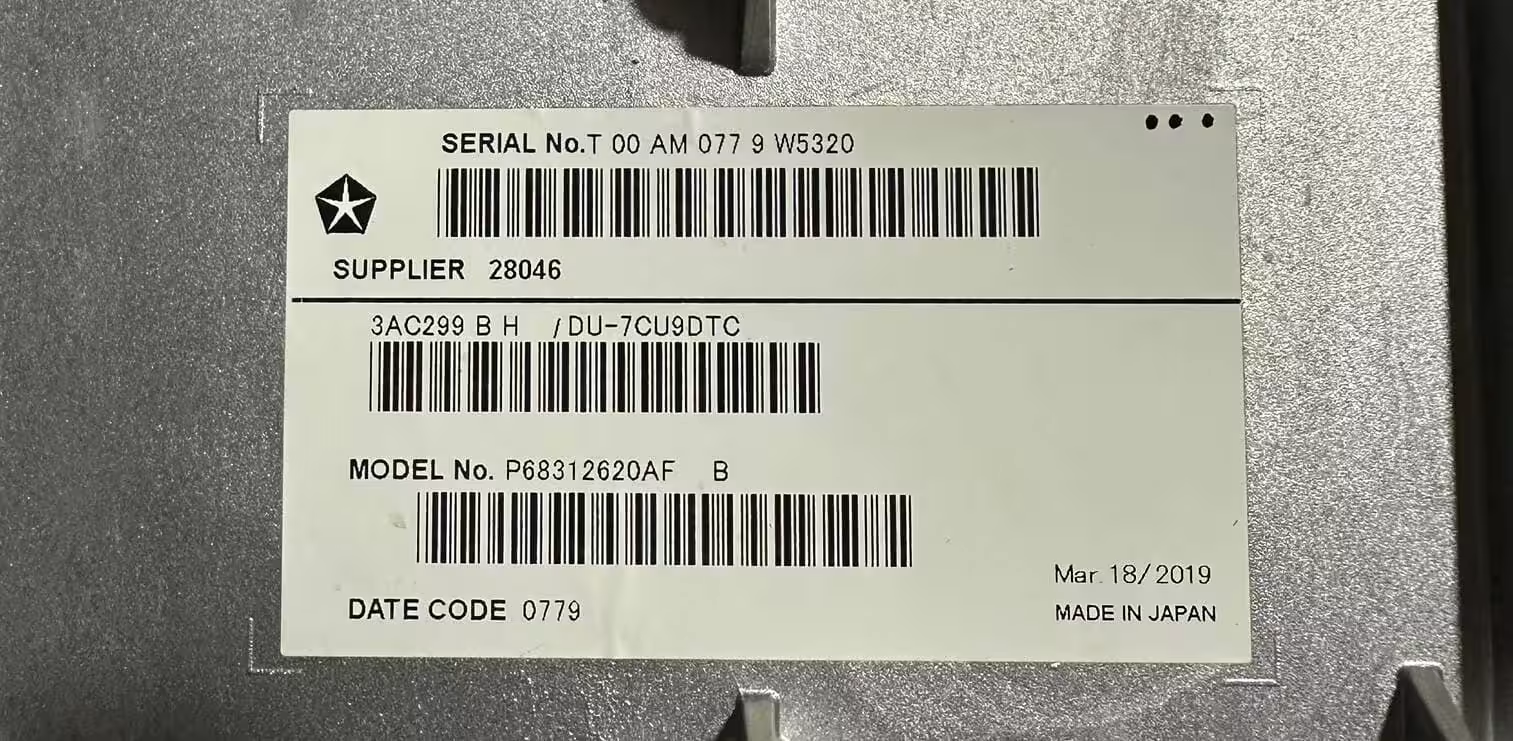
Close-up of the serial number sticker on a Dodge radio unit.
Check the radio casing
Look for a sticker on the back or side of the unit. The serial often begins with the letter T.
Use the full serial
Enter the complete serial exactly as shown. Missing or swapped characters may generate the wrong result.
Send a clear photo
If you’re not sure which characters count, take a clear photo of the radio label before placing your request.
Popular Dodge radio code guides
Dodge fitted several different factory radio and infotainment units over the years, sourced from brands like Alpine, Harman, and Panasonic. Some drivers have a simple single-DIN Alpine unit, while others have a full Uconnect touchscreen. The unlocking process is similar for all of them, but each unit has its own serial format and button sequence.
Choose the Dodge radio model below if you want a more specific guide for your unit.
Dodge RB1 Radio Code
The RB1 is an Alpine-built unit found in older Dodge models such as the Caliber, Avenger and Nitro. If the display shows CODE, the unlock code can usually be recovered from the T-serial number on the radio casing.
View RB1 GuideDodge RB3 Radio Code
The RB3 is a Harman-built factory radio used across several Dodge vehicles. It can lock and ask for a security code after a flat battery, battery replacement or radio swap. The serial number is normally found on the unit label.
View RB3 GuideDodge Uconnect 8.4 Radio Code
The Uconnect 8.4 touchscreen is used in many newer Dodge vehicles and can lock after power loss or a battery disconnect. Use the full T-serial number to request the correct radio code online.
View Uconnect 8.4 GuideDodge RES Radio Code
The RES is a Continental-built Dodge radio that can become locked after a battery disconnection. The serial number printed on the casing can help recover the original security code.
View RES GuideWhy Dodge radios ask for a security code
Most Dodge factory radios include a built-in anti-theft security system. After a battery replacement, flat battery, radio swap, or electrical interruption, the unit may lock itself and display “CODE” or “LOC” before it can be used again.
This feature is designed to stop a stolen radio from being reused in another vehicle. In most cases, the original code can still be recovered using the serial number printed on the radio casing, without needing a dealer visit.
Dodge factory radios are commonly manufactured by brands such as Alpine, Harman, Panasonic, Continental, and Delphi, and are fitted across the Charger, Challenger, Durango, Journey, Caliber, Avenger, Nitro and Ram ranges. Most of these units use serial numbers beginning with the letter T, while newer Uconnect systems may show a longer alphanumeric reference on screen.
Before requesting a code, double-check that the serial number has been entered correctly. A single incorrect character can generate the wrong result. If the label is worn, scratched, or hard to read, taking a clear close-up photo of the sticker can help avoid mistakes.
Some Dodge radios will temporarily lock after several incorrect code attempts. If this happens, the radio usually needs to stay powered on for a set period before another attempt can be made.
How to enter the Dodge car radio code
After receiving the code, turn on the radio and wait for the CODE screen to appear. On most Dodge units, you’ll enter each digit using preset buttons 1 to 4: press button 1 repeatedly until the first digit is shown, then repeat with buttons 2, 3 and 4 until the full code is displayed. If you scroll past the digit you need, keep pressing until it cycles back around.
Once the correct code is showing, press and hold the ENTER or OK button for a few seconds to confirm it. The exact confirmation button can vary slightly depending on the radio model fitted to your vehicle.
If the radio still shows CODE or LOC afterward, avoid entering random numbers repeatedly. Too many incorrect attempts can extend the waiting time before you’re allowed to try again.
Dodge models we can help with
Our online service can help with many factory radio units fitted across popular Dodge vehicles. Whether your car has an RB1, RB3, RES or a Uconnect touchscreen, the serial number is the most important detail for finding the correct code.
- Charger
- Challenger
- Durango
- Journey
- Caliber
- Avenger
- Nitro
- Ram
- Grand Caravan
- Nitro SXT
- Dart
- Viper
Why use RadioCodePro?
No dealer visit
Request your code online without booking an appointment or waiting at a dealership.
Simple process
Enter your serial number, complete the secure checkout, and receive the result by email.
Support included
If something looks wrong with the serial number, we can help you check the radio label.
Dodge car radio code FAQ
Where is the Dodge radio serial number located?
The serial number is usually printed on a label on the back or side of the radio unit, and it typically starts with the letter T. On some newer Uconnect systems, it can also be found in an on-screen menu.
Can I retrieve my Dodge car radio code without visiting a dealer?
Yes. In most cases, the code can be requested online using the radio serial number, without booking a service appointment.
How long does it take to receive the code?
Delivery is usually fast, but some Dodge codes may take a little longer depending on the radio model and verification needed.
What if my code does not work?
First, check that the serial number was entered correctly. If the serial is wrong, incomplete, or missing a character, the code may not match the radio.
What serial numbers are supported?
Most Dodge T-serial numbers are supported. The best approach is to enter the full serial number exactly as printed on the radio label.