Ford Focus Radio Code by Serial Number
Get Your Ford Focus Radio Code Without a Dealer Visit
Battery died, had some electrical work done, or picked up a used Focus with the stereo stuck on “CODE”? The Ford Focus radio code can almost always be recovered from the serial number printed on or displayed by the unit — no workshop appointment needed.
This applies whether your Focus has the 4500 RDS, the 6000 CD, a Ford Sony unit, or the newer MK8 touchscreen system. Once we have your serial, the matching code is emailed straight to you.
Enter Your Focus Serial Number
Use the serial shown on the radio screen, or printed on the label if nothing displays. Focus serials usually start with V or M.
Ford radio · Not a Ford? Change the make
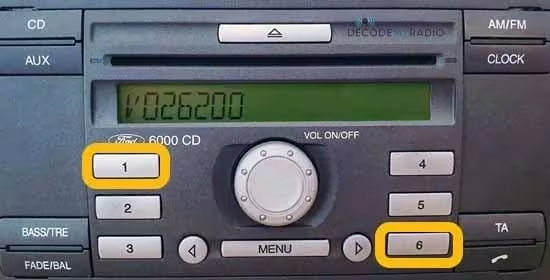
Tip: hold buttons 1 + 6 for a couple of seconds — if nothing appears, try 2 + 6 instead.
How to Find Your Ford Focus Radio Serial Number
Most Focus radios can show their serial number right on the display, without touching a single screw. Switch the radio on, then press and hold buttons 1 and 6 together for a couple of seconds. The screen will cycle through some readouts, and a serial starting with V should appear along the way, followed by six digits — for example V026200.
Didn’t get anything useful? Turn the radio off, then on again, and hold 2 and 6 instead. This second combination tends to work on older units and reveals an M serial, formatted the same way.
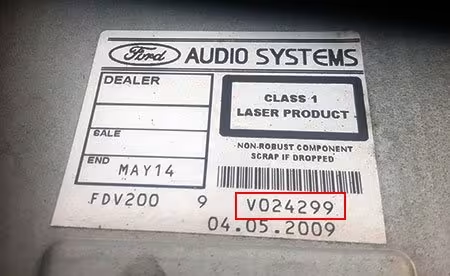
If neither combination shows anything, the radio needs to come out of the dash instead. A pair of release keys pushed into the front slots is usually enough to slide it forward, revealing a label on the back of the unit with the serial printed on it — for example V024299.
Ford Focus Radio Units We Cover
Ford fitted a handful of different factory systems to the Focus over the years. The unit fitted matters more than the exact model year, so check which one you have below.
Why Does the Focus Radio Ask for a Code?
This has nothing to do with the radio being broken. Ford builds an anti-theft feature into its factory units — the moment power is cut, whether from a flat battery, a replacement battery, a jump start, or some dashboard work, the radio locks itself and refuses to play until it’s given the correct code again.
If the screen shows CODE, LOCKED, or a similar message, resist the urge to start guessing numbers. A handful of wrong attempts can trigger a longer lockout, so it’s worth gathering the correct serial first and entering the real code once you’ve got it.
Ford 6000 CD on the Focus
The 6000 CD was fitted to a huge number of Focus models built between 2004 and 2008. Holding 1 and 6 usually brings the serial straight to the screen. Got a 6000 CD and already have your V or M serial? Head to our dedicated Ford 6000 CD Radio Code Generator for unit-specific instructions.
Ford Sony Units on the Focus
Some Focus models, especially higher-spec trims, came with a factory Sony system instead. These can lock up the same way after a power cut. If your Focus has a Sony unit showing a serial starting with V, M, or a longer C7-prefixed code, our Ford Sony Radio Code page covers it in detail.
Common Ford Focus Serial Number Examples
These are just examples of the format — your own serial will be specific to your radio. Always copy it exactly as shown, since one wrong character produces a different code.
How It Works
Find the serial
Hold 1 + 6 (or 2 + 6 on older units), or check the back label if nothing appears on screen.
Enter it online
Type your Focus’s serial exactly as shown, for example V026200 or V024299.
Receive your code
Your Ford Focus radio code is emailed to you, with simple instructions for entering it.
Entering the Code on Your Focus
Once your code arrives, switch the radio on until it shows CODE or ENTER CODE. Press button 1 repeatedly until the first digit is correct, then move to button 2 for the second digit, and so on through buttons 3 and 4. Once all four digits match, confirm by pressing and holding button 5 — Sony units usually confirm with the * (asterisk) button instead.
Take your time reading the screen before entering the code, since an incorrect entry can extend the waiting period before your next attempt.
Ford Focus Radio Code FAQ
How do I find my Ford Focus radio serial number?
Turn on the radio and hold buttons 1 and 6 together for a couple of seconds. A serial starting with V should appear on the display, for example V026200. If nothing shows, switch off and try holding 2 and 6 instead, which reveals an M serial on older units.
What does a Ford Focus radio serial number look like?
Most Focus units show a V or M serial followed by 6 digits, such as V026200 or V024299. Some Sony units use a longer C7-prefixed serial instead.
What if the serial number doesn’t appear on screen?
Some early 6000 CD units don’t display it this way. In that case, the radio needs to be released from the dashboard using release keys, and the serial is printed on a label on the back of the unit.
Which Ford Focus radio units does this cover?
We cover the 4500 RDS, 6000 CD, Ford Sony and MK8 factory units fitted across Focus generations, using V, M or C7-prefixed serial numbers.
Why does my Focus radio ask for a code in the first place?
Ford factory radios lock themselves as a security measure whenever they lose power, such as after a flat battery, a battery replacement, or dashboard work. It isn’t a fault — the unit simply needs its original code re-entered.
What happens if I enter the wrong code too many times?
A handful of wrong attempts can trigger a longer lockout period, so it’s best to confirm the correct serial and code before entering anything, rather than guessing.