Retrieve Your Ford Radio Code Online
If your Ford radio is locked after a flat battery, battery replacement or radio removal, you can recover your Ford radio code using the serial number from the unit. The serial number helps identify the radio and the correct security code for your Ford system.
This page is made for common Ford systems such as Ford 6000 CD, Ford Sony, Fiesta, Focus, Transit, Mondeo, C-Max and other factory radios that ask for a security code. Whether you need a Ford Focus radio code, a Transit code or a code for a 6000 CD unit, the first step is normally finding the correct radio serial number.
Enter Your Ford Serial Number
Use the serial number shown on the radio screen or printed on the label. Ford serials often start with M or V.
Ford radio · Not a Ford? Change the make
Tip: On many Ford radios, hold buttons 1 + 6 or 2 + 6 to display the serial number on screen.
How to Find Your Ford Radio Serial Number
Most Ford radios need a serial number before a Ford radio code can be recovered. On many Ford 6000 CD, Ford Focus, Ford Fiesta and Ford Transit units, the serial can be displayed directly on the screen. Try holding buttons 1 and 6 together for a few seconds. If that does not show the serial, try 2 and 6.
The number you need usually looks like M123456 or V123456. If the radio does not show it on the screen, you may need to remove the radio slightly and check the sticker on the top, side or back of the unit. Make sure every letter and number is copied exactly as shown.
This is particularly useful when looking for a Ford Focus radio code, Ford Transit radio code or a code for a Ford 6000 CD radio, because the serial number is normally the key information needed to identify the radio.
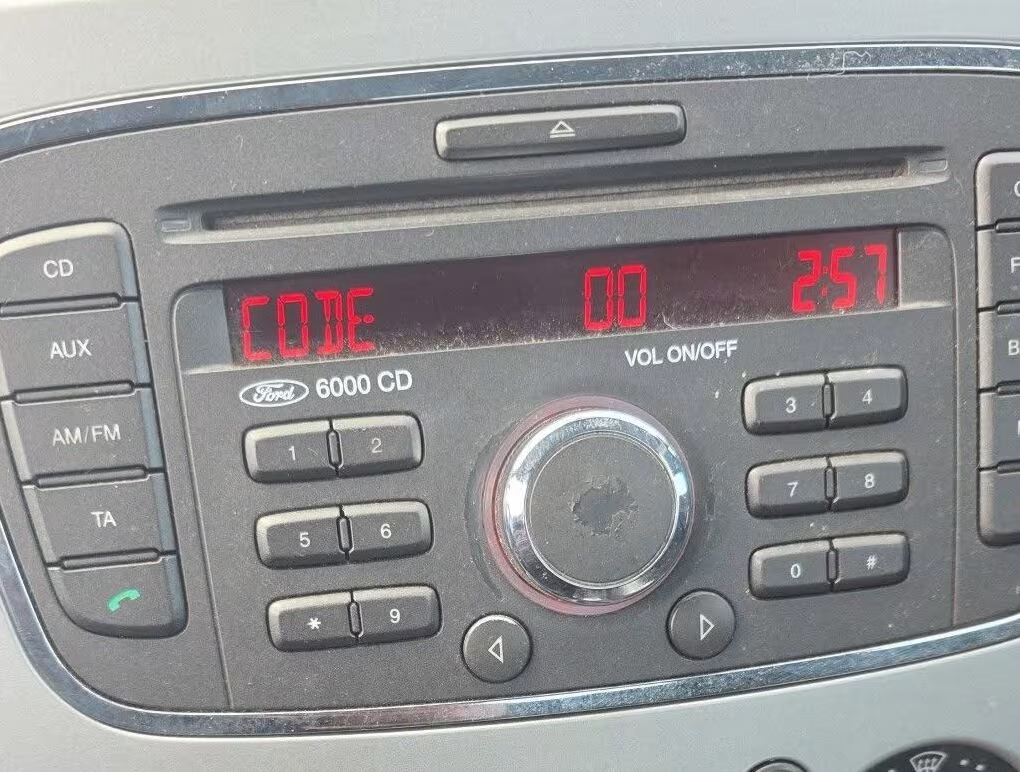
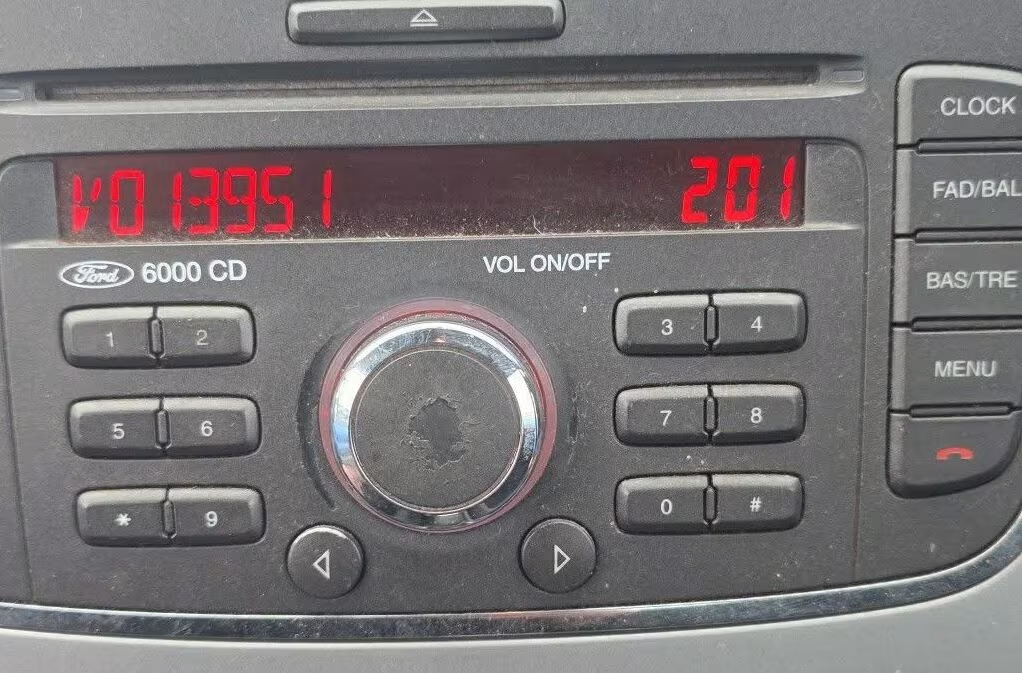
Ford Radios We Can Help With
Ford used different radio units over the years, but many of them follow the same basic process: once the serial number is known, the correct radio security code can be recovered online. This includes popular Ford models such as Fiesta, Focus, Transit, Mondeo and Kuga, as well as common factory radio systems such as the Ford 6000 CD and Ford Sony units.
We also have dedicated information pages for several Ford radio types and models. For example, you can learn more about the Ford Fiesta radio code, Ford Transit radio code, Ford Kuga radio code or Ford Mondeo radio code using the dedicated pages.
Common Ford Radio Code Situations
A Ford radio code is usually requested after power has been disconnected from the vehicle. This can happen after a flat battery, a battery change, an electrical repair, or when the radio has been removed. Once power is restored, the radio may display CODE, LOCKED or another security message.
Some Ford radios show messages such as CODE, LOCKED, WAIT or LOCKED 13. If your radio is asking for a code, do not keep entering random numbers. Too many wrong attempts can lock the unit for longer.
Ford 6000 CD Radio Code
The Ford 6000 CD is one of the most common factory radios fitted to Ford vehicles in the UK. It can be found in models such as the Focus, Fiesta, Mondeo and Transit. In many cases the serial number can be displayed by pressing the 1 and 6 buttons together.
If you own a Ford 6000 CD radio and already have an M or V serial number, you can use our dedicated Ford 6000 CD Radio Code Generator page to retrieve the correct security code online.
Ford Sony Radio Code
Some Ford models come with a factory Sony radio instead of the standard 6000 CD unit. These radios can also ask for a security code after the battery has been disconnected. If your Ford Sony radio shows a serial number starting with V or M, you can check our dedicated Ford Sony Radio Code page for more specific details about this model.
Ford Focus Radio Code
The Ford Focus has been fitted with several different factory radio systems, including Ford 6000 CD and Sony units. If your Focus radio is showing CODE or asking for a security code, check the radio screen for the serial number before requesting a Ford radio code.
On compatible units, holding 1 + 6 or 2 + 6 can display the serial. If the serial is not shown on screen, check the label on the radio itself. Having the complete serial number helps avoid mistakes when recovering the code.
Ford Transit 6000 CD Radio Code
Ford Transit models can also use the Ford 6000 CD radio and other factory-fitted Ford units. If your Transit radio has lost its code after a battery change or power interruption, first find the serial number displayed on the radio or printed on its label.
For a Transit with an M or V serial, the serial should be copied exactly as displayed. You can also see our dedicated Ford Transit Radio Code page for more information.
Ford Radio Security Code
The terms Ford radio code and Ford radio security code generally refer to the unlock code required by the radio after power has been disconnected. The exact process depends on the radio model and serial format.
If your Ford radio is displaying CODE, LOCKED or WAIT, avoid guessing the security code. Check the serial number first and use the information from the radio itself when requesting the correct code.
Ford M Serial and V Serial Codes
Many Ford radios use serial numbers starting with M or V. These are important details for Ford radio code recovery. Always check the full serial carefully, because one wrong digit can result in the wrong code.
Some Ford units may use other serial formats, so if your radio does not show an M or V serial, check the complete label on the unit before proceeding.
How It Works
Find the serial
Check the radio screen using 1 + 6 or 2 + 6, or look for the serial number on the radio label. Ford serials often use an M or V followed by numbers.
Enter it online
Type your Ford serial number exactly as shown, for example M123456 or V123456. Check the characters carefully before submitting the serial.
Receive your code
Once processed, your Ford radio code is sent by email with simple instructions for entering the security code into the radio.
Before You Enter the Code
Make sure the serial number is correct before ordering your Ford radio code. If your radio shows several screens after pressing 1 + 6, take a clear photo of the screen showing the serial. For label serials, take a photo of the sticker on the radio casing.
If the unit says WAIT or LOCKED, leave the ignition and radio switched on until it allows code entry again. Do not try random codes, especially if the radio already shows a locked message.
If you are dealing with a Ford Focus, Fiesta, Transit, Mondeo or another Ford model, the radio serial is more useful than the vehicle registration number when identifying many Ford radio code systems.
Ford Radio Code FAQ
Where is the Ford radio serial number?
It can often be displayed on the screen by holding buttons 1 + 6 or 2 + 6. If not, check the label on the top, side or back of the radio unit. The serial is usually the key information needed when requesting a Ford radio code.
What does a Ford serial number look like?
Many Ford radios use serial numbers such as M123456 or V123456. Some other Ford units may use different serial formats depending on the radio model. Always copy the complete serial exactly as shown.
Does this work for Ford 6000 CD?
Yes, Ford 6000 CD is one of the most common radio types. You normally need the serial number first, then the correct Ford radio code can be recovered. Many 6000 CD units can display the serial using the 1 + 6 button combination.
Can I get a Ford Focus radio code online?
Yes. If your Ford Focus radio is asking for a code, find the serial number from the screen or label and enter it online to request the correct Ford radio code. Focus models can use different factory radio systems, so check the radio details carefully.
What if my Ford radio says LOCKED 13?
LOCKED 13 usually means too many wrong code attempts were made. Do not keep trying random codes. In some cases the radio may need extra steps before accepting another code.
How to Enter Your Ford Radio Code
Once you receive the correct Ford radio code, entering it is usually very simple. Most Ford 6000 CD and Ford Focus radios use the preset buttons to enter each digit.
The exact button sequence can vary between Ford radio models, so make sure you follow the instructions for your particular unit.
If you are unsure how to enter the code correctly, this short video shows the process step by step:
External YouTube tutorial showing how to enter a Ford radio security code.