VW Golf Radio Code
If your Volkswagen Golf radio is showing SAFE, CODE, or asking for a security code after a flat battery, battery replacement, radio swap, or electrical repair, you can request the unlock code online using the radio serial number.
Most VW Golf factory radios use a serial number that starts with VWZ. Once you have the full serial number from the radio label, you can enter it below and request the correct code for your unit.
Enter your VW Golf serial number
Most Volkswagen Golf radio serial numbers start with VWZ.
VW Golf radio locked in SAFE mode?
A Volkswagen Golf radio may lock itself and display SAFE mode when the power supply has been interrupted. This usually happens after the car battery has been disconnected, replaced, gone flat, or after the radio has been removed from another vehicle and fitted into your Golf.
This is a normal anti-theft function used on many original Volkswagen radios. The unit will not play music again until the correct 4-digit security code is entered.
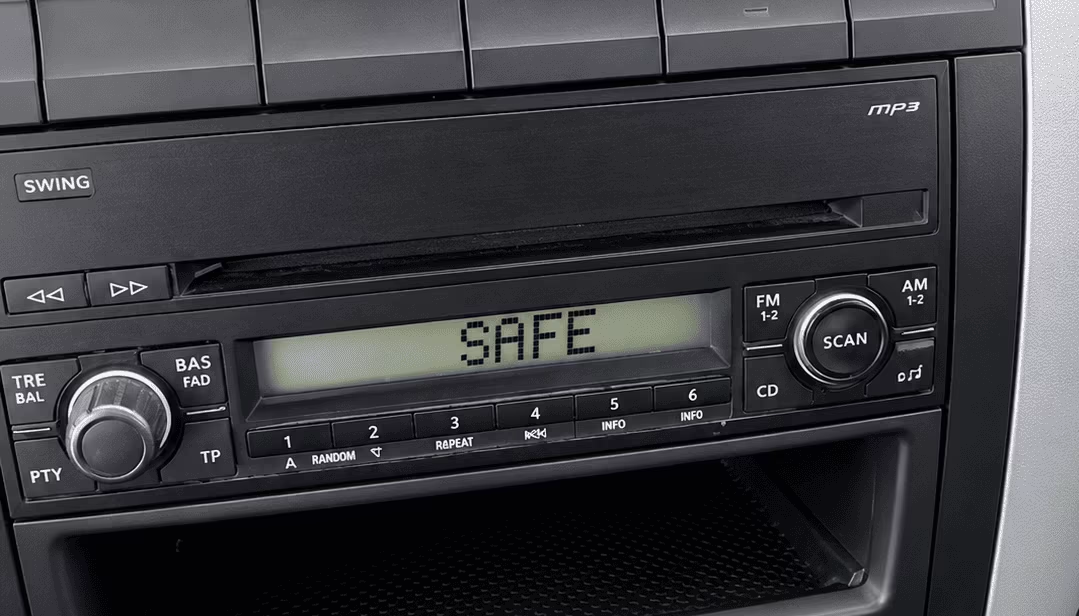
Example of a VW Golf radio locked in SAFE mode and waiting for the correct code.
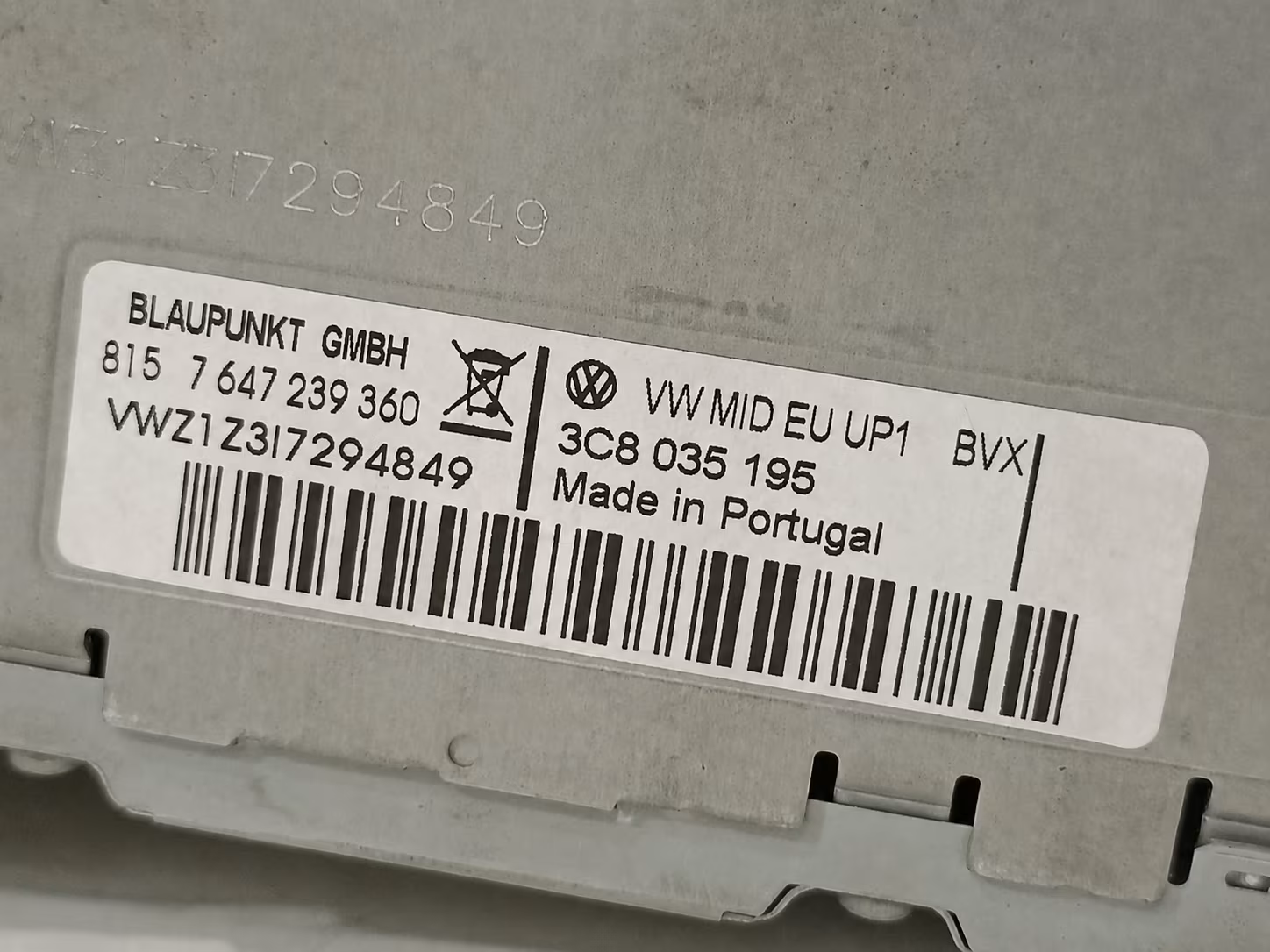
Example of a Volkswagen radio label where the serial number starts with VWZ.
How to find the VW Golf radio serial number
To retrieve the correct VW Golf radio code, you need the serial number from the radio itself. In most cases, this serial number is printed on a sticker attached to the top, side, or back of the radio unit.
The serial number usually starts with VWZ, followed by more letters and numbers. It is important to enter the full serial exactly as shown on the label. One wrong character can lead to the wrong code.
Remove the radio carefully
Most Golf radios need to be gently removed from the dashboard so the label can be checked properly.
Look for the VWZ serial
The code is normally recovered using the serial number printed on the radio label, often beginning with VWZ.
Use a clear photo
If you are not sure about the serial, take a clear photo of the full radio label before requesting the code.
Volkswagen Golf models supported
The VW Golf has used many different factory radios over the years. Older Golf models may have Beta, Gamma, RCD 300 or RCD 500 units, while newer models may use RCD 310, RCD 510, RNS navigation systems, Composition Media or Discover Media units.
The exact radio model is not always obvious from the outside. That is why the serial number from the radio label is the most important detail when requesting a VW Golf radio code.
- VW Golf Mk4 radio code
- VW Golf Mk5 radio code
- VW Golf Mk6 radio code
- VW Golf Mk7 radio code
- VW Golf Mk8 radio code
- VW Golf GTI radio code
- VW Golf Plus radio code
- VW Golf Estate radio code
- VW Golf Cabriolet radio code
- VW Golf Match radio code
Common radios fitted to the VW Golf
Volkswagen fitted different radio and navigation units depending on the Golf generation, trim level, market, and year. Below are some of the most common units found in VW Golf vehicles.
VW RCD 300 Radio Code
The RCD 300 is common in Volkswagen Golf Mk5 and other VW models. If the display shows SAFE, the code can usually be recovered from the VWZ serial number printed on the radio label.
View RCD 300 GuideVW RCD 310 Radio Code
The RCD 310 is often found in Golf Mk6 and later Volkswagen models. It may ask for a security code after a flat battery, battery replacement, or radio replacement.
View RCD 310 GuideVW RCD 510 Radio Code
The RCD 510 touchscreen radio is a popular unit in many Volkswagen Golf models. If it enters SAFE mode, the full VWZ serial number is needed to request the correct unlock code.
View RCD 510 GuideVW RNS 510 Radio Code
The RNS 510 is a Volkswagen navigation and multimedia system used in many Golf models. If it becomes locked after battery disconnection, the serial number can help recover the original security code.
View RNS 510 GuideWhy does a VW Golf radio ask for a code?
Volkswagen radios include a security system designed to protect the unit if it is removed from the car or loses power. When the power supply is interrupted, the radio may ask for the original security code before it can be used again.
This can happen even if the radio is original to the vehicle. A flat battery, battery replacement, jump start, alternator repair, fuse issue, dashboard repair, or radio removal can trigger the code request.
Many drivers first notice the problem when the Golf radio displays SAFE on the screen. In this state, the radio is locked and will not operate until the correct code is entered.
The good news is that the code can normally be recovered using the serial number printed on the radio label. You do not usually need the VIN number for this type of request. The most important detail is the complete radio serial number.
How to enter the VW Golf radio code
After receiving your VW Golf radio code, switch on the radio and wait for the code entry screen to appear. If the display still shows SAFE, leave the radio powered on until it allows code entry again.
On many VW Golf radios, the preset buttons are used to enter the four digits of the code. Button 1 changes the first digit, button 2 changes the second digit, button 3 changes the third digit, and button 4 changes the fourth digit.
After the correct code is displayed on the screen, press and hold the confirmation button. Depending on the radio model, this may be OK, SCAN, SEEK, MODE, or another button. The exact confirmation method can vary between RCD, RNS and older Volkswagen units.
Avoid trying random codes. If the wrong code is entered too many times, the radio may increase the waiting time before another attempt is allowed.
Before requesting your VW Golf radio code
Before placing your request, check that the radio serial number is complete and easy to read. Volkswagen serial numbers can contain similar-looking characters, especially when the label is old, scratched, dirty, or poorly photographed.
Do not use the VIN only
For most online VW Golf radio code requests, the radio serial number is required. The VIN alone is usually not enough.
Check every character
Make sure the serial starts with VWZ and enter all characters exactly as they appear on the label.
Keep the radio powered
If the radio is locked after wrong attempts, it may need to stay switched on before it allows another code entry.
Why use RadioCodePro?
RadioCodePro helps VW Golf owners recover their original radio code online without booking a dealer appointment. The process is simple: find the radio serial number, enter it online, complete the secure checkout, and receive the code by email.
No dealer visit
Request your VW Golf radio code online without waiting for a dealership appointment.
Simple serial check
Use the VWZ serial number from the radio label to request the correct unlock code.
Support included
If your label is unclear, support can help you check which serial number is needed.
VW Golf radio code FAQ
Where is the VW Golf radio serial number?
The serial number is usually printed on a label on the top, side, or back of the radio unit. In many cases, the radio must be removed from the dashboard to read it.
Does the VW Golf radio serial number start with VWZ?
Many Volkswagen Golf radio serial numbers start with VWZ. Enter the full serial number exactly as printed on the radio label.
Can I get a VW Golf radio code online?
Yes. In most cases, the VW Golf radio code can be requested online using the radio serial number.
Why does my VW Golf radio show SAFE?
SAFE mode usually appears after a battery change, flat battery, power interruption, or radio replacement. The radio needs the correct security code before it can be used again.
Can I get the code using the VIN number?
For most VW Golf radio code requests, the radio serial number is required. The VIN alone is usually not enough for an online code request.
What happens if I enter the wrong code?
If the wrong code is entered several times, the radio may lock temporarily and increase the waiting time before another attempt is allowed.
Which VW Golf radios are supported?
Many original Volkswagen Golf radios are supported, including RCD 300, RCD 310, RCD 510, RNS 510 and other VW factory units with a readable serial number.
How long does it take to receive the code?
Delivery is usually fast, but some Volkswagen codes may take longer depending on server availability and verification.