VW RNS 315 Radio Code From Serial Number
Has your Volkswagen RNS 315 navigation unit started asking for a security PIN? The original four-digit code can be recovered using the identification details printed on the radio label.
Enter the complete serial exactly as it appears on the unit. This page also shows where to find the label, what information to copy and how to avoid unnecessary lockout delays.
Enter the RNS 315 serial
Copy the serial from the physical identification label on the navigation unit.
Volkswagen radio · Not a Volkswagen? Change the make
Where to find the VW RNS 315 serial number
The information needed for an RNS 315 code request is located on the manufacturer label fixed to the metal casing. It is not normally visible while the navigation unit is installed flush in the dashboard.
Remove the unit only far enough to inspect the label, or ask a qualified installer to do it for you. Photograph the whole sticker before refitting the radio. A full image is more useful than a cropped serial because it also shows the model and part references.
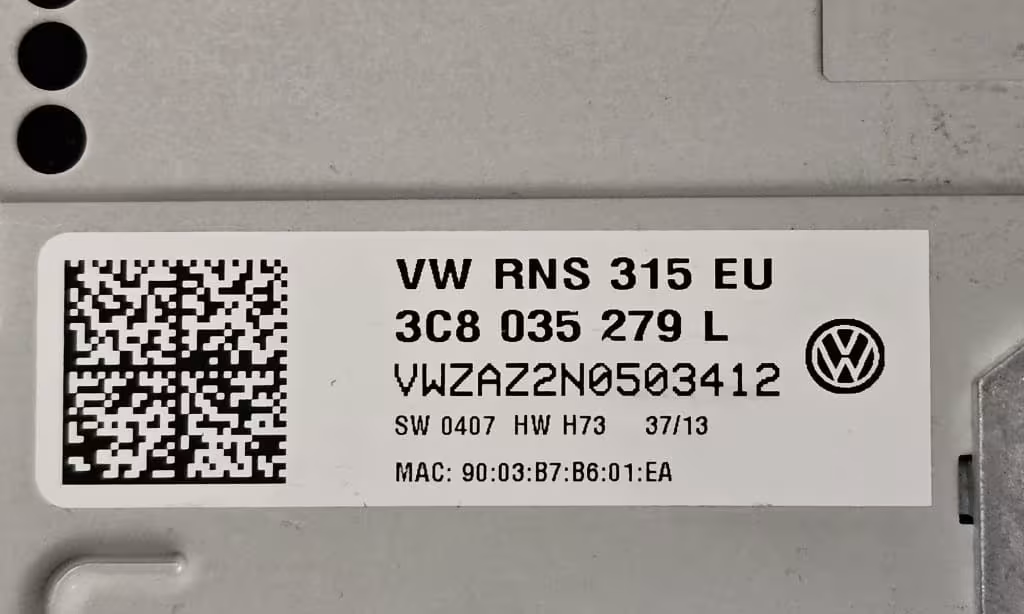
Use the casing label
Read the identification sticker attached directly to the radio. Do not rely on a handwritten number from an advert or old paperwork.
Copy every character
Similar characters such as 0 and O or 1 and I can be confused. Zoom in on your photograph before completing the request.
Keep the full photo
A clear picture of the complete label makes it easier to verify the radio model, serial and part information if support is required.
How the RNS 315 radio code service works
Find the label
Carefully inspect the sticker attached to the RNS 315 casing and take a sharp, well-lit photograph.
Submit the serial
Enter the full serial without changing its order. Review it once more before completing the secure checkout.
Receive the PIN
Once processed, the four-digit RNS 315 security code is delivered to the email address used for the order.
What is the Volkswagen RNS 315?
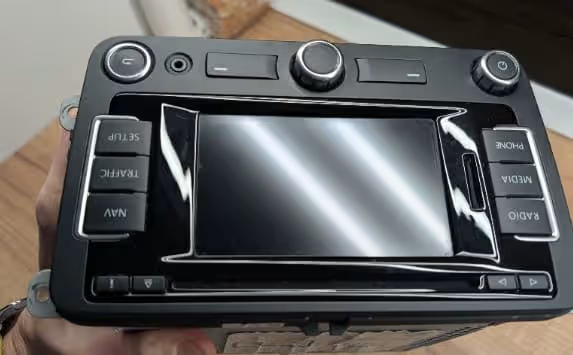
The RNS 315 is a factory Volkswagen radio-navigation system with a colour touchscreen. It combines audio controls and navigation functions in one dashboard unit and was fitted to a range of Volkswagen vehicles from the same model era.
It can be mistaken for other VW touchscreen units, particularly the larger RNS 510 or the non-navigation RCD 510. Checking the product label is more reliable than identifying the radio from the front panel alone.
| Detail | RNS 315 information |
|---|---|
| Unit type | Factory radio and navigation system |
| Display | Colour touchscreen interface |
| Security | Four-digit anti-theft radio PIN |
| Code request detail | Complete serial from the physical radio label |
| Common confusion | RNS 510, RNS 310 or RCD 510 |
Why does the RNS 315 ask for a security code?
The radio PIN is part of the unit’s anti-theft protection. A code request may appear after the navigation system has been disconnected, replaced, transferred to another vehicle or affected by a power interruption.
A battery change does not guarantee that every RNS 315 will ask for the PIN, because the behaviour can depend on the vehicle and the unit’s previous pairing. However, when the code screen does appear, the correct four-digit PIN must be entered before normal operation can resume.
Buying a used RNS 315 is another common situation. The seller may supply the unit without its original radio card or code record. In that case, obtain a clear photograph of the unit label before installation and keep it with your purchase documents.
RNS 315 serial number or vehicle VIN?
These are different identifiers. The VIN belongs to the vehicle, while the RNS 315 serial identifies the navigation unit itself. For this online service, you should submit the serial shown on the radio casing.
Radio serial
Found on the RNS 315 label and tied to the individual navigation unit. This is the primary detail required here.
Vehicle VIN
Identifies the Volkswagen vehicle. Do not enter it in the serial field unless a separate service specifically requests it.
Part number
Helps confirm which radio version you have, but it is not a replacement for the unique serial number.
How to enter the VW RNS 315 radio code
Switch on the ignition and the RNS 315. When the PIN entry screen is available, use the touchscreen number field to enter the four digits carefully, then confirm the entry using the on-screen control.
The exact wording and screen appearance may vary between software versions. Follow the prompts shown by your own unit rather than repeatedly testing different combinations.
Common mistakes that can delay an RNS 315 code request
Submitting the VIN
The vehicle VIN is not the same as the RNS 315 serial printed on the radio casing.
Cropping the photograph
A tiny crop can hide useful model or part details. Keep the complete identification sticker visible.
Misreading characters
Double-check zeros, letters and any faint characters before submitting the form.
Choosing the wrong unit
RNS 315 and RNS 510 are different systems. Compare the unit and label before ordering.
Using an incomplete serial
Do not remove characters because they appear repetitive. Submit the sequence exactly as printed.
Trying random PINs
Guessing can increase the waiting time and make troubleshooting harder.
Volkswagen vehicles commonly associated with RNS 315 units
The RNS 315 appeared across several Volkswagen ranges, although equipment differs by year, market and trim level. Always identify the installed radio from its label rather than assuming compatibility from the vehicle model alone.
- Volkswagen Golf
- Volkswagen Jetta
- Volkswagen Passat
- Volkswagen Tiguan
- Volkswagen Touran
- Volkswagen Caddy
- Volkswagen Polo
- Volkswagen Beetle
- Volkswagen Scirocco
- Volkswagen Eos
Other Volkswagen radio code guides
Not sure that your unit is an RNS 315? Compare it with the related Volkswagen radio and navigation guides below.
VW RCD 300 Radio Code
Guide for the earlier RCD 300 audio unit, including where to find its VW identification details.
View RCD 300 GuideVW RCD 310 Radio Code
Information for Volkswagen RCD 310 units that request a security code after power loss or replacement.
View RCD 310 GuideVW RCD 510 Radio Code
Dedicated page for the touchscreen RCD 510 audio system, which does not include the same navigation setup as the RNS range.
View RCD 510 GuideVW RNS 510 Radio Code
Use this guide when the installed unit is the larger RNS 510 navigation system rather than the RNS 315.
View RNS 510 GuideWhy order through RadioCodePro?
Online request
Submit the RNS 315 details online without arranging a dealership appointment.
Clear identification guide
The label examples help you locate and copy the correct serial before ordering.
Email delivery
The processed code is sent to the email address supplied during checkout.
VW RNS 315 radio code FAQ
Where can I find the VW RNS 315 serial number?
It is printed on the identification label attached to the metal casing. The radio normally needs to be removed far enough from the dashboard to read the complete sticker safely.
Can I get an RNS 315 radio code from the VIN only?
The radio serial is the key identification detail for this service. Do not substitute the vehicle VIN for the serial printed on the RNS 315 label.
How many digits are in the VW RNS 315 radio code?
The RNS 315 normally uses a four-digit anti-theft security code.
Why is my RNS 315 asking for a code?
It may request the PIN after the unit has been disconnected, replaced, transferred to another vehicle or affected by an electrical power interruption.
What should I do if the RNS 315 shows SAFE or a waiting message?
Stop trying random codes. Leave the unit properly connected and follow the waiting instructions shown on its screen before making another carefully checked attempt.
Is the RNS 315 security code printed on the radio label?
The label contains identification details such as the serial and part information. The four-digit PIN itself is not normally printed openly on the casing sticker.