VW RNS 510 Radio Code From VWZ Serial Number
If your Volkswagen RNS 510 navigation unit is asking for a security code, it usually means the radio lost power after a flat battery, battery replacement, repair work, or radio removal.
To recover the correct code, you normally need the serial number from the RNS 510 label. Most Volkswagen navigation units use a serial number beginning with VWZ.
Enter your RNS 510 serial number
Use the full VWZ serial number printed on the navigation unit label.
Volkswagen radio · Not a Volkswagen? Change the make
VW RNS 510 asking for a security code
The RNS 510 is a factory Volkswagen navigation system used in many Golf, Passat, Tiguan, Touran, Jetta and other VW models. When the unit loses power, the anti-theft system may activate and the screen can ask for a code before the radio or navigation can be used again.
This is normal after a battery change or after the navigation unit has been removed from the dashboard. The important part is to use the correct serial number, because the code must match the exact unit installed in the car.
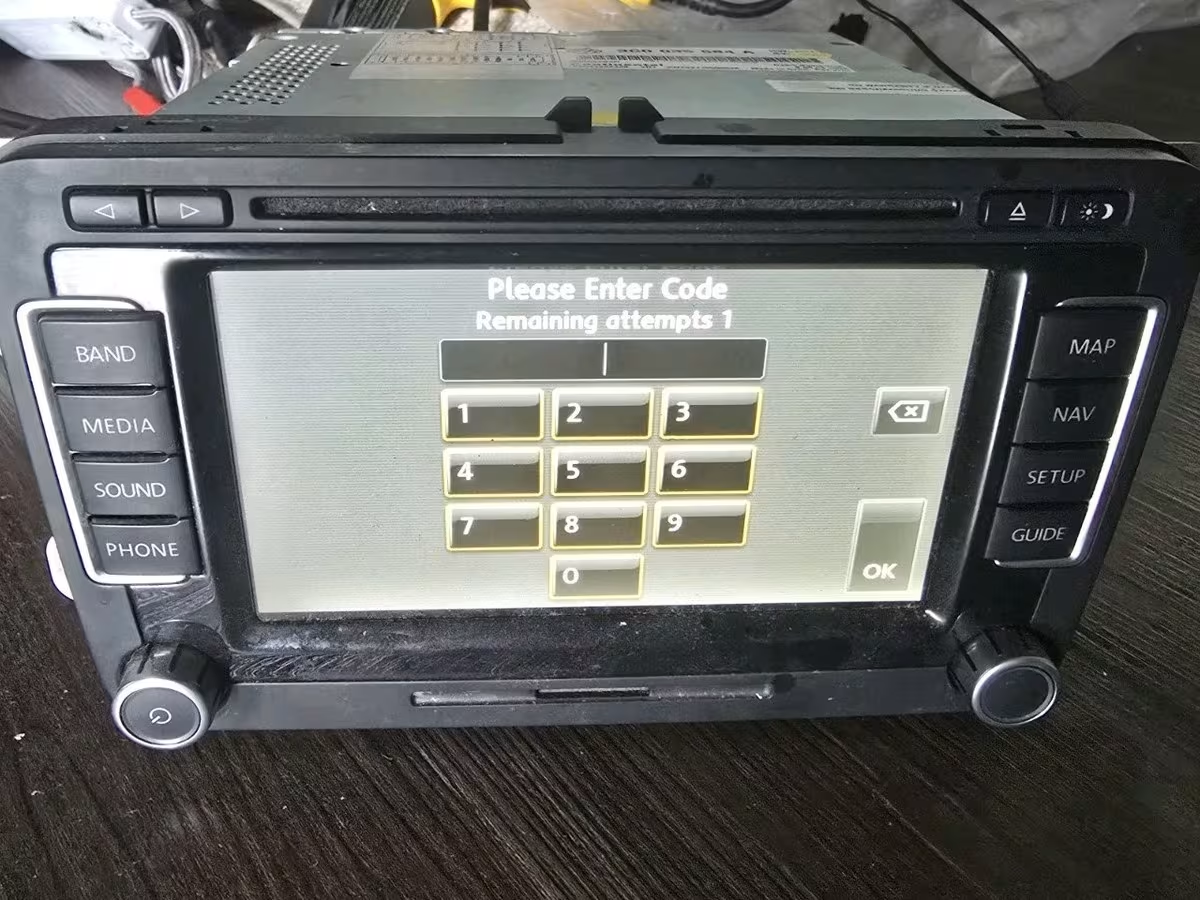
Example of a Volkswagen RNS 510 navigation unit asking for a security code.
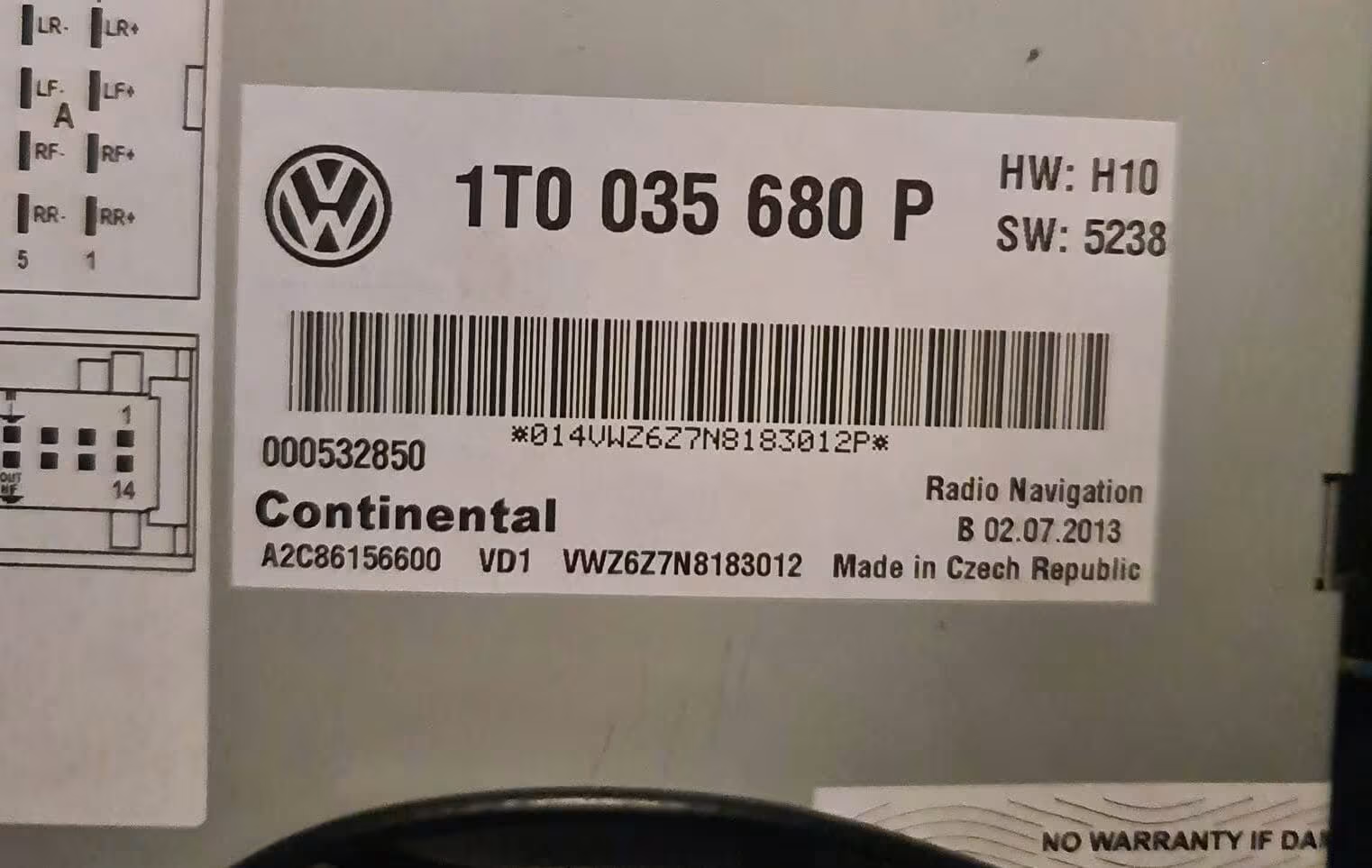
Example of an RNS 510 label where the VWZ serial number is printed.
How to find the RNS 510 serial number
For most RNS 510 units, the serial number is printed on a label attached to the radio casing. You usually need to remove the navigation unit from the dashboard carefully to see the sticker.
Look for a serial number starting with VWZ. It may be printed together with other details such as the part number, model information, production date, or manufacturer reference.
Check the label
The serial is normally on the top, side, or back label of the RNS 510 unit.
Use the full VWZ number
Enter the complete serial exactly as shown. Missing letters or numbers can lead to a wrong code.
Take a clear photo
If the label is hard to read, take a clear photo before requesting the code.
You can also check our full Volkswagen radio code guide for more examples of VW serial numbers and general instructions for Volkswagen radios.
Common RNS 510 serial number examples
Volkswagen RNS 510 serial numbers can look slightly different depending on the unit version and manufacturer, but many of them start with VWZ. Always copy the serial from your own label, not from an example online.
- VWZ1Z2A1234567
- VWZ6Z7K1234567
- VWZ4Z4M9876543
- VWZ7Z7P7654321
- VWZ3Z2L4567890
- VWZ5Z6N2345678
These are only example formats. Your own serial number must be taken from the label of your RNS 510 navigation unit.
Volkswagen models commonly fitted with RNS 510
The RNS 510 was used across many Volkswagen models, especially on higher trim cars or vehicles equipped with factory navigation. If your screen asks for a code, the process is usually based on the serial number from the unit.
- Golf Mk5
- Golf Mk6
- Passat B6
- Passat B7
- Tiguan
- Touran
- Jetta
- Scirocco
- Caddy
- EOS
- Touareg
- Transporter T5
RNS 510, RCD 300 and other Volkswagen radios
Volkswagen used several factory radio and navigation systems over the years. The RNS 510 is the larger navigation unit, while models such as RCD 300, RCD 310 and RCD 510 are more common standard radio units.
If your Volkswagen has an RCD 300 radio and not an RNS 510 navigation unit, visit our dedicated VW RCD 300 Radio Code page for model-specific details and serial number examples.
Some Golf, Polo, Passat, Touran and Caddy models use the RCD 310 unit. If your radio label shows a VWZ serial number, the code recovery process is similar. A dedicated VW RCD 310 guide can help users with that exact model and keep the RNS 510 instructions cleaner.
Why your RNS 510 code must match the serial number
The radio code is linked to the individual navigation unit. That is why guessing codes or using random numbers from forums is risky. Even if two RNS 510 units look identical from the front, the internal details and serial numbers can be different.
Before ordering, check the serial number carefully. If one character is wrong, the code may not work. This is especially important with VWZ serials, because some letters and numbers can look similar on old or scratched labels.
If the unit has already had several wrong attempts, do not keep trying random codes. Leave the radio powered on if it shows a waiting message, then enter the correct code only when the unit allows another attempt.
How to enter the VW RNS 510 radio code
Once you receive the correct code, switch on the RNS 510 and wait for the security code screen. Use the touchscreen or radio controls to enter the digits carefully.
After entering the code, confirm it using the on-screen option or the button shown by the unit. The exact display can vary slightly depending on the software version, but the idea is the same: enter the code, confirm it, and wait for the unit to unlock.
If the code screen is not available because the unit is locked after wrong attempts, keep the ignition and radio on until the waiting time clears. Do not disconnect the battery again during this waiting period.
Why use RadioCodePro?
No dealer visit
Request your RNS 510 code online without booking an appointment at a dealership.
Simple process
Find the VWZ serial number, enter it online, and receive the result by email.
Support included
If the label is unclear, you can check the details before entering the code.
VW RNS 510 radio code FAQ
Where is the RNS 510 serial number located?
The serial number is usually printed on a label on the top, side, or back of the RNS 510 navigation unit. In most cases, the unit must be removed from the dashboard to read it.
What does a VW RNS 510 serial number look like?
Many RNS 510 serial numbers begin with VWZ, followed by more letters and numbers. Always use the full serial number from your own label.
Can I get the RNS 510 code without visiting a Volkswagen dealer?
Yes, in many cases the code can be requested online using the serial number from the radio label.
Does this work if the unit says SAFE or CODE?
Yes, SAFE or CODE usually means the unit is asking for the security code. You still need the correct serial number before requesting the code.
What if the code does not work?
First, check that the serial number was entered correctly. One wrong character can generate the wrong result. If the serial was misread, the label details should be checked again.
Is RNS 510 the same as RCD 510?
No. RNS 510 is a navigation unit, while RCD 510 is a radio unit with a touchscreen. They can look similar, but they are not the same model.