Get your Vauxhall Zafira radio code by serial number online
If your Zafira’s radio has gone quiet and is showing CODE or asking for an unlock code after a battery change, flat battery, or a trip to the garage, you don’t need to book in at a Vauxhall dealer. You can get your original unlock code online using the radio’s own serial number.
We cover the full range of units fitted to the Zafira over the years, from the standard Blaupunkt and Delco CD30/CD70 stereos to the Siemens VDO navigation and Connect systems that some models use.
Get Your Zafira Radio Code
Enter your Vauxhall Zafira radio serial number below:
Vauxhall radio · Not a Vauxhall? Change the make
How to find your Vauxhall Zafira radio serial number
Where the serial number sits depends on which unit is fitted to your Zafira. Some models let you pull it up on screen in seconds, while others mean taking the radio out and reading the label on the casing.
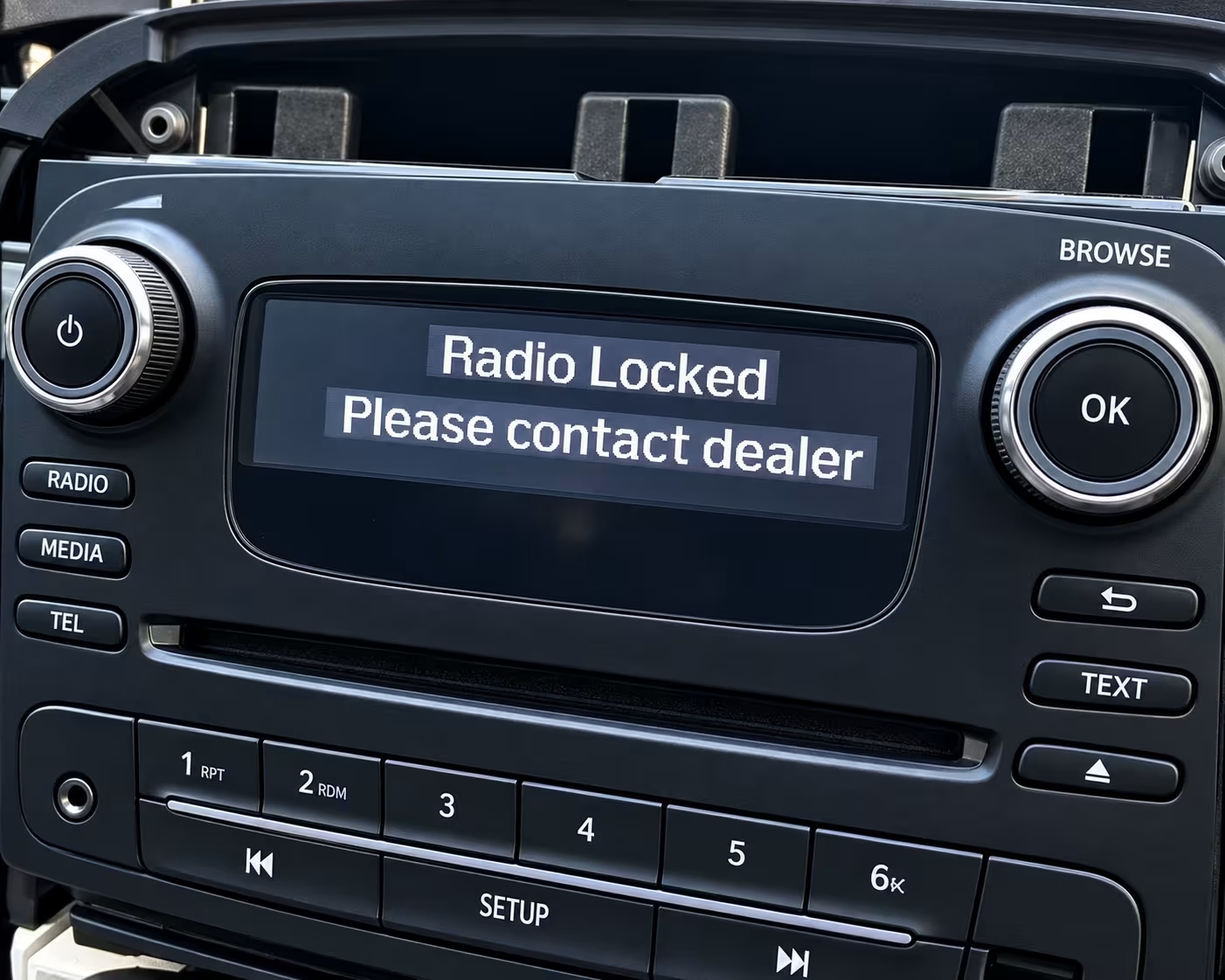
Example of a Vauxhall Zafira radio display locked and asking for the unlock code.
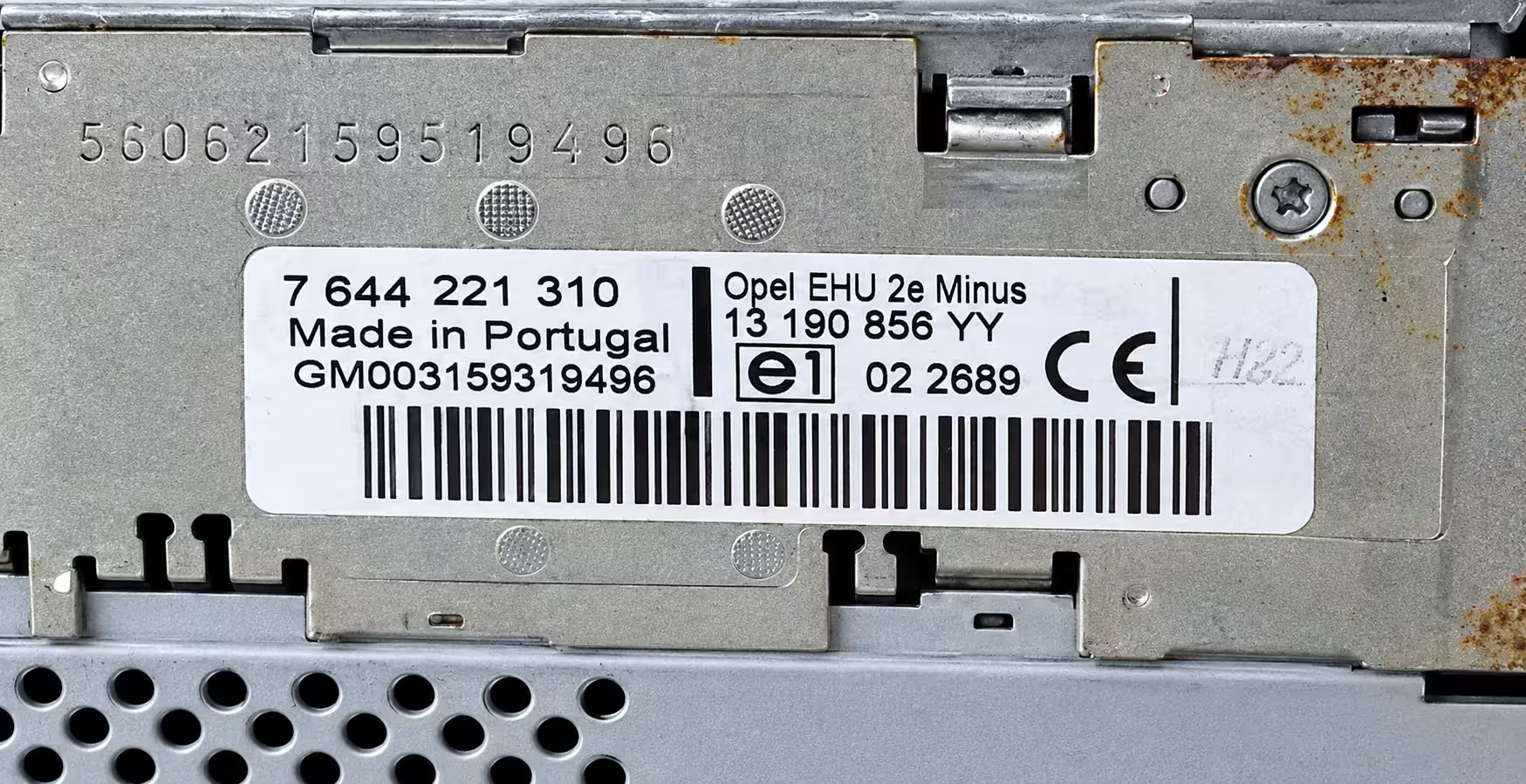
Example of where the serial number label sits once the unit is removed from the dash.
Method 1: On-Screen (1 + 6)
While the radio is asking for a code, press and hold buttons 1 and 6 together for about 5 seconds, then let go. A serial number should appear on the display. If it doesn’t, try holding 2 and 6 instead.
Method 2: Nav & Connect Units
On sat-nav or Connect systems, enter any wrong 4-digit code and press OK, then repeat this two more times on purpose. After the third wrong attempt, the screen locks and shows a Serial Number, a Device Number, and a Date, which you’ll need together.
Method 3: Remove & Check Label
If neither on-screen method works, use a set of radio release keys in the four holes around the fascia to slide the unit forward. The serial is printed on a label or engraved on the side, and on some Zafira units it’s a longer 14-digit number.
Why does your Zafira radio lock in the first place?
It’s not a fault, it’s a built-in anti-theft measure. The moment the radio loses power, whether that’s from a flat battery, a battery replacement, a garage disconnecting the leads, or a blown fuse, the unit locks itself so it’s useless to anyone who tries to steal it.
Putting the correct code back in switches everything back on straight away. The one thing to avoid is guessing: typing in random numbers repeatedly can lock the radio for a set period, and on some units it may need a longer wait before you’re able to try again.
Zafira radio and navigation units we cover
Whichever generation of Zafira you’re driving, one of these will likely match your setup:
- Blaupunkt CD Radio
- Delco CD30 / CD70
- Siemens VDO CDR 500
- Vauxhall Connect Units
- Vauxhall Navigation Systems
- Zafira A & B Factory Units
Check our dedicated guides for Vauxhall Corsa, Vauxhall Astra, Vauxhall Meriva or Vauxhall CD30.
Why the Zafira sometimes needs a 14-digit serial
Some Zafira owners run into a snag where the on-screen shortcut only shows a short number, but the code lookup asks for a full 14-digit serial. This is common with the Siemens VDO CDR 500 unit fitted to a lot of Zafiras. If that happens to you, it’s worth removing the radio and checking the label closely, since a digit or two can easily be overlooked, especially if the label is worn or partly obscured.
1. Turn the ignition and radio on until the display shows
CODE.2. Key in your 4-digit unlock code using the number preset buttons.
3. Confirm the entry as prompted by your unit (this step can vary slightly between models).
4. The radio should unlock immediately and return to normal use.
Why choose RadioCodePro?
No Dealer Trips
Skip the dealership appointment, the paperwork, and the wait, just to get your Zafira’s radio talking again.
Fast Email Delivery
Enter your serial, place your request safely online, and receive your guaranteed code direct to your inbox.
Expert Support
Struggling to read the label or find the right numbers? Send us a photo and our technical team will help.
Vauxhall Zafira radio code FAQ
How do I find the serial number on my Vauxhall Zafira radio?
On radios with number preset buttons, hold buttons 1 and 6 together for around 5 seconds while the display is asking for a code. If nothing shows, try holding 2 and 6 instead. If neither works, you’ll need to remove the unit and check the label on the casing.
Why does my Zafira radio ask for a 14-digit serial number?
Many Zafira units, particularly the Siemens VDO CDR 500, use a longer 14-digit serial printed on the unit’s label rather than a short on-screen code. If your display only shows a short number, check the physical label carefully, as some digits are easy to miss.
What if my Zafira has sat-nav or a Connect unit instead of a standard radio?
Navigation and Connect units often need three pieces of information together: the serial number, a device number, and a date shown on the screen. One way to reveal these is to enter an incorrect 4-digit code three times in a row on purpose, which locks the screen and displays all three.
How do I enter the unlock code once I have it?
Switch on the ignition and radio until CODE appears on the display, then key in your 4-digit code using the number buttons and confirm. The exact button layout can vary slightly by unit, so check your code confirmation email for guidance if unsure.
What happens if I enter the wrong code too many times?
Vauxhall radios lock you out temporarily after repeated wrong attempts, and some units require a waiting period before you can try again. Always double-check your code and serial number before entering anything to avoid this.