Vauxhall Meriva Radio Code Generator by Serial Number
If your Vauxhall Meriva radio is displaying SAFE or 7 SAFE after a battery change, you need the original 4-digit security code to unlock it.
We can retrieve the factory code for all Meriva stereo models including CDR 2005, CD30, CD30 MP3, CAR 2003, CCR 2006, and CDC 40 Opera.
Get Your Meriva Radio Code
Enter your Vauxhall serial number below:
Vauxhall radio · Not a Vauxhall? Change the make
How to find your Vauxhall Meriva serial number
The serial number cannot be viewed on the dashboard screen (which only displays “SAFE”). You must remove the head unit from the dashboard using radio removal pins. The serial number is stamped directly into the metal frame or printed on a side sticker.
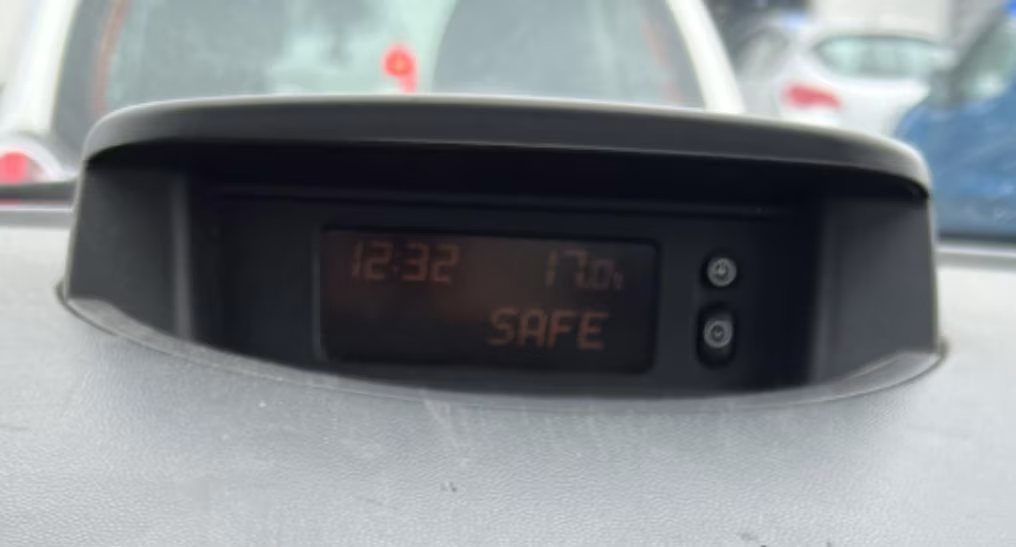
Vauxhall Meriva display in SAFE mode (code required).
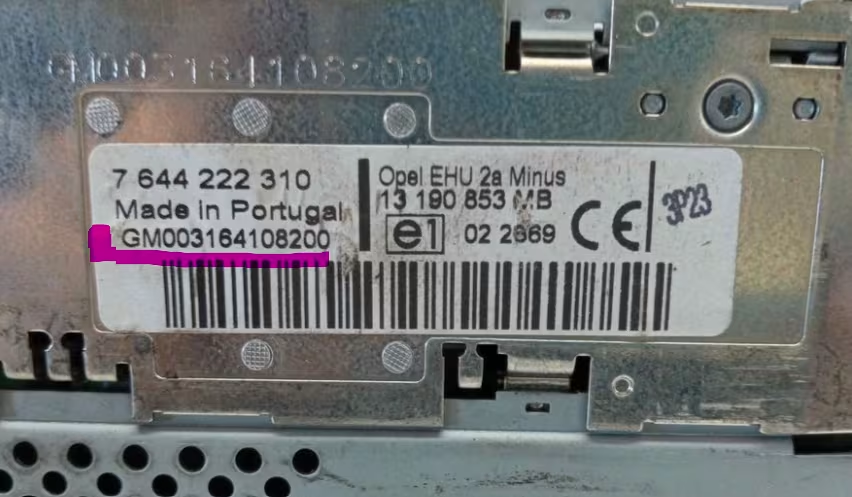
GM serial number label located on the side panel of the radio.
Step 1: Remove Radio
Insert 4 release keys into the holes on the front panel of the radio until they click, then pull gently to remove the unit.
Step 2: Locate GM Serial
Check the right or left side metal casing for a stamped 14-character code starting with GM (e.g. GM0205…).
Step 3: Get Your Code
Enter the GM serial number in the generator box above to receive your official 4-digit unlock code instantly.
Supported Vauxhall Meriva radio models
Our system supports all original radio models installed across Vauxhall Meriva A and Meriva B generations:
- Siemens VDO CDR 2005
- Blaupunkt CAR 2003 / CDR 2005
- Delphi Grundig CD30 / CD30 MP3
- Philips CAR 400 / CCR 600
- CDC 40 Opera / DVD 90 Navi
- Vauxhall Meriva A (2003 – 2010)
- Vauxhall Meriva B (2010 – 2017)
- All GM units with 14-digit serial numbers
Check our guides for Vauxhall Corsa, Vauxhall Astra, Vauxhall Zafira, or Vauxhall Vivaro.
1. Turn off the radio and ignition.
2. Hold down the AS button.
3. Turn on the ignition and keep holding AS until you hear a beep and the display shows
10 ----.4. Press button 1 repeatedly for the 1st digit, button 2 for the 2nd, button 3 for the 3rd, and button 4 for the 4th digit.
5. Once the correct code is displayed, press and hold AS until you hear a beep. The radio is now unlocked!
Why choose RadioCodePro?
Fast & Accurate
Retrieve your official manufacturer radio code online in minutes without main dealer delays.
100% Guaranteed
All codes are generated directly from official databases. Full refund if the code does not work.
Expert Support
Need help removing your radio or entering the code? Our support team is ready to guide you.
Vauxhall Meriva radio code FAQ
How do I find the serial number on my Vauxhall Meriva radio?
The serial number cannot be read directly from the screen. You must remove the radio using release keys. The serial number is stamped into the metal casing or printed on a label on the side, usually starting with GM.
What does ‘SAFE’ mean on my Vauxhall Meriva display?
‘SAFE’ indicates the radio is locked after a battery disconnect or incorrect code attempts. To enter the code, turn off the ignition, hold the ‘AS’ button, turn the ignition on, and wait until ’10 —-‘ appears.
How do I enter the unlock code in a Vauxhall Meriva radio?
Hold down the ‘AS’ button while turning on the radio until you hear a beep and see ’10 —-‘. Use preset buttons 1-4 to enter each digit of your code, then press and hold ‘AS’ until you hear a confirmation beep.
What if my Meriva display says ‘SAFE’ with no numbers?
If it shows ‘SAFE’ without ’10 —-‘, the radio is in a waiting period. Keep the ignition and radio turned ON for 30 to 60 minutes to reset the timer.