Vauxhall Corsa Radio Code by Serial Number
Get Your Vauxhall Corsa Radio Code by Serial Number
Battery gone flat, had some dashboard work done, or picked up a secondhand Corsa with the stereo stuck on SAFE? The correct unlock code can almost always be recovered online, using either the GM serial printed on the radio or the details shown on screen — no dealer booking required.
Vauxhall radio · Not a Vauxhall? Change the make
Two Ways to Find Your Corsa’s Details
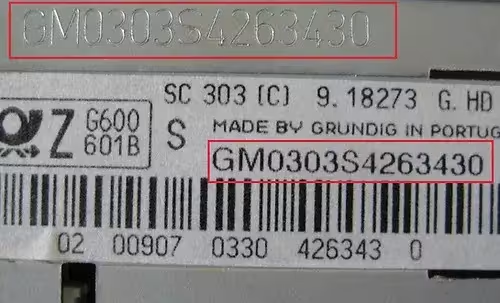
Which route applies to you comes down to which radio is fitted. Older Corsa models — the B, C and early D generations — typically run a CD30, CD30 MP3 or CDR2005 unit, and these need to slide partway out of the dash so the label can be read. Nothing needs unplugging; a simple pair of radio release keys pushed into the front slots (or, in a pinch, a bent wire coat hanger) is usually enough.
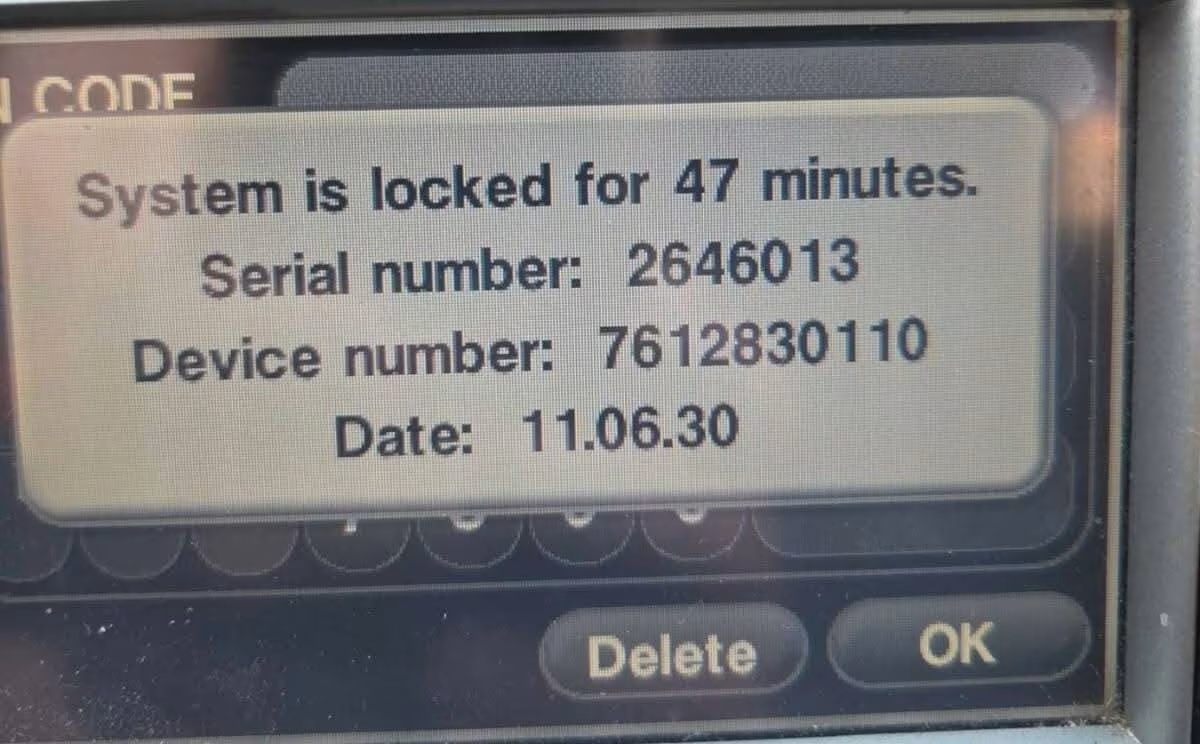
Newer Corsa E and F models with IntelliLink or R4.0 work differently. There’s no need to touch the radio at all — after a few incorrect code attempts, the screen itself lays out everything needed: a serial number, a device number, and a date, right there on the dashboard.
What That SAFE Screen Is Actually Telling You
Seeing SAFE or CODE on your Corsa’s display isn’t a fault — it’s the radio’s anti-theft feature doing exactly what it’s meant to. Once locked, IntelliLink and R4.0 systems show a serial number, a device number and a date, and together those three are what let us generate your actual unlock code.
Write all three down exactly as they appear, or take a photo of the screen before it clears. Getting even one character wrong on any of the three means the code we generate won’t match your unit.
Worth knowing: resist the urge to keep entering random codes to “test” the radio. Every failed attempt pushes the lockout timer further out, so it’s better to gather the correct details first and enter the real code once.
Common Corsa Serial Number Examples
Serial formats vary depending on which unit your Corsa has fitted. These examples show the general shape — your own serial will be unique to your radio.
Corsa Generations We Cover
Whichever Corsa you’re driving, the radio type fitted matters more than the exact model year.
The same lookup method applies across the range. Head over to our main Vauxhall Radio Code page, check our dedicated Astra guide, or if you specifically have a CD30 unit, our dedicated CD30 guide covers it in detail.
How It Works
1. Find Your Details
Check the radio label for CD30/CDR2005 units, or read the serial, device number and date shown on screen for IntelliLink and R4.0 units.
2. Submit Online
Enter the details into our secure form and complete checkout — no dealer visit, no waiting room.
3. Get Your Code
Your Corsa radio code lands in your inbox, along with simple instructions for entering it.
How to Enter the Code on Your Corsa
On most CD30-style units, press and hold the AS button while switching the radio on, then keep holding it for around 10 seconds until you hear a beep and the display shows a row of dashes. Enter each digit by pressing the matching preset button that many times — for a code of 5678, press button 1 five times, button 2 six times, button 3 seven times, and button 4 eight times — then press AS again to confirm.
IntelliLink and R4.0 systems usually prompt you on screen for the code and confirm it with an OK or Enter button instead. If your screen shows SAFE or WAIT after a wrong entry, leave the ignition and radio switched on until it clears before trying again.
Vauxhall Corsa Radio Code FAQ
Where do I find the serial number on my Corsa radio?
On CD30, CD30 MP3 and CDR2005 units the serial is printed on a label on the side or top of the radio, visible once it’s released from the dashboard using a pair of radio release keys. On IntelliLink and R4.0 systems the details show directly on the screen instead.
What does a Corsa radio serial number look like?
Most CD30/CDR2005 units use a serial starting with GM, followed by around 12 digits — for example GM020531873184. Some units also list a shorter M-prefixed reference on the same label.
Do I need to remove the radio to get the code?
Only for older CD30-style units, and even then nothing needs unplugging — a set of radio release keys is enough to slide it forward. IntelliLink and R4.0 systems don’t need removing at all, since the serial, device number and date appear on screen after a few wrong attempts.
My Corsa radio shows a serial, device number and date on screen. What do I do with these?
This happens on IntelliLink and R4.0 systems after entering an incorrect code three times. Note down all three values exactly as shown, since every one of them is needed to generate the correct unlock code.
What if I enter the wrong code again?
Too many wrong attempts extend the lockout period, so it’s worth waiting for the timer to clear rather than guessing repeatedly. Leave the ignition and radio switched on until it allows another attempt.
Does this work for all Corsa generations?
Yes. We cover the Corsa B, C, D, E and F generations, including CD30, CD30 MP3, CDR2005, CD70, IntelliLink and R4.0 systems.