Get your Vauxhall CD30 radio code using the serial number
If your Vauxhall or Opel CD30 radio is showing SAFE after a battery change, flat battery, radio replacement or dashboard repair, the unit usually needs the original security code before it can work again.
You can request the CD30 radio code online using the details from the radio label. This guide shows where to find the serial number, what to check before ordering, and how to tell your CD30 apart from similar Vauxhall units.
Enter your CD30 serial number
Use the serial number and radio details from the label on the CD30 unit.
Vauxhall radio · Not a Vauxhall? Change the make
How to find the Vauxhall CD30 serial number
For most CD30 units, the safest way to identify the radio is to remove it carefully and check the sticker on the top or side of the casing. The label may include the serial number, part number, model name, manufacturer details and other references needed to match the correct code.
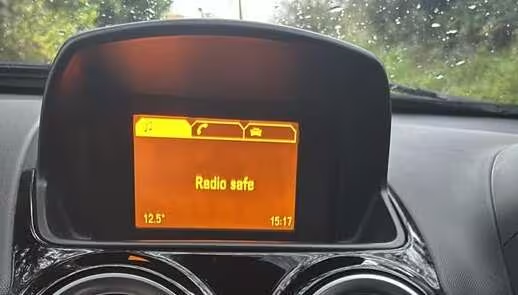
Example of a Vauxhall Corsa radio showing SAFE mode and asking for the security code.
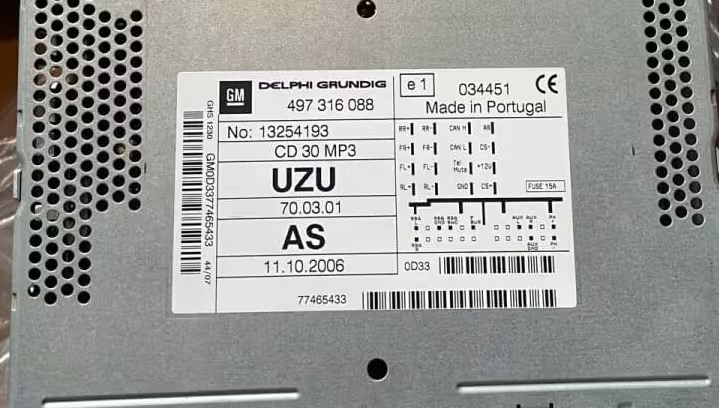
Example of an Opel Corsa D CD30 radio label where the serial and radio details are printed.
Check the label
Look for the sticker on the CD30 radio casing. This is normally where the important serial and part details are printed.
Use clear details
Enter the full serial number exactly as shown. One wrong digit or letter can lead to the wrong code.
Photo helps
If the label is hard to read, take a clear photo before ordering so the details can be checked properly.
Why does the CD30 radio show SAFE?
The SAFE message appears when the radio is locked by its anti-theft system. This usually happens after the car battery has been disconnected, the battery went flat, the radio was removed, or the electrical system was repaired.
The CD30 security code is unique to the radio unit. Guessing random codes is not recommended because too many wrong attempts may make the radio lock for a longer waiting time.
If your screen shows SAFE, leave the radio powered on until the code entry screen appears. Then enter the correct code using the radio buttons.
CD30 vs CD70: which one do you have?
Vauxhall fitted a few different single-DIN stereos across the same model range, and the CD30 and CD70 are the two you’ll come across most often. The CD30 is the more basic of the pair, playing a single CD with straightforward radio functions. The CD70 usually builds on that with extras like steering wheel controls, an auxiliary input, or in some versions a small multi-disc changer.
Both units lock in the same way and both show SAFE when disconnected from power, so the anti-theft behaviour is identical. Where they differ is the label layout and the code format used behind the scenes, which is why it matters to know exactly which one is fitted before requesting a code. If you’re not sure which unit is in your car, the model name is usually printed clearly on the front panel or on the removal label itself.
Vauxhall and Opel models using CD30 radios
The CD30 unit is commonly found in many Vauxhall and Opel vehicles, especially older UK and European models.
- Vauxhall Corsa
- Opel Corsa
- Vauxhall Astra
- Opel Astra
- Vauxhall Zafira
- Opel Zafira
- Vauxhall Meriva
- Opel Meriva
- Vauxhall Vectra
- Opel Vectra
- Vauxhall Signum
- Opel Combo
How to enter the Vauxhall CD30 radio code
Once you receive your code, switch the ignition on and turn on the CD30 radio. Wait until the radio allows code entry. Use the preset buttons to enter each digit of the security code.
Depending on the unit, you may need to confirm the code by holding the main button, OK button, AS button, or another confirmation button. Do not keep trying random numbers if the code is not accepted, since repeated wrong entries can extend the waiting time before you can try again.
Common CD30 mistakes to avoid
Mixing up letters and numbers
Labels can be small or worn, so it’s easy to read an O as a 0 or an I as a 1. Double-check any ambiguous character before submitting.
Using paperwork instead of the label
Serial numbers printed in a handbook or on paperwork may not match the actual unit fitted to your car. Always take the serial from the radio itself.
Entering the code too fast
Some CD30 units need each digit entered with a short pause between presses. Going too quickly can register the wrong number.
Why use RadioCodePro?
No dealer visit
Request your CD30 code online without booking an appointment or waiting at a dealership.
Simple process
Enter your serial number, complete the secure checkout, and receive the result by email.
Support included
If something looks wrong with the label or serial number, we can help you check the details.
Vauxhall CD30 radio code FAQ
Where is the CD30 serial number located?
The serial number is usually printed on the radio label, often on the top or side of the CD30 unit, and is only visible once the radio has been removed from the dashboard.
Can I get the CD30 radio code without visiting a dealer?
Yes. In most cases, the code can be requested online using the serial number and details from the radio label, without booking a dealer appointment.
What does SAFE mean on a Vauxhall CD30 radio?
SAFE means the radio’s anti-theft system has locked the unit and it needs the original security code before it can be used again.
What is the difference between a CD30 and a CD70 radio?
The CD30 is Vauxhall’s standard single-CD stereo, while the CD70 usually adds extra features such as a multi-disc changer or steering wheel controls. Both use a similar SAFE lock system, but the code format and label layout can differ slightly.
How long does delivery take?
Delivery is usually fast, but some codes may take longer depending on verification and server availability.
What if my code does not work?
First, check that the serial number and radio details were entered correctly. If the label was misread, the code may not match the radio. Send us a clear photo of the label so we can double-check the details.