Nissan X-Trail Radio Code by Serial Number
Radio locked after a flat battery, a battery swap, or an X-Trail you’ve just picked up secondhand? Recover the correct unlock code online using the serial number from the label, or straight from the display if your X-Trail runs an LCN, Connect or Bosch navigation system.
Covers X-Trail factory units from Clarion, Blaupunkt and Daewoo, plus Nissan Connect, Connect 2, Connect 3 and LCN infotainment systems, fitted across the T30, T31 and T32 generations sold between 2001 and today.
Get Your X-Trail Radio Code
Nissan radio · Not a Nissan? Change the make
Use the serial number from your radio label, or the serial, device number and date shown on screen after a lockout.
Nissan X-Trail Radio Code Service
The X-Trail has carried a fair mix of factory radio brands across its three generations, so the right approach really depends on which unit landed under your dashboard. Clarion and Blaupunkt radios rely on a printed serial you can only read once the unit’s out, while LCN, Connect and Bosch systems give up their details on screen instead, no tools required.
Because these formats look nothing alike, it’s worth checking which type is fitted in your X-Trail before ordering, so you send us the right details the first time.
Clarion X-Trail Radios
Common on early T30 and T31 models — no on-screen shortcut available.
- CL serial numbers
- PN serial numbers
- PP serial numbers
Blaupunkt X-Trail Radios
Blaupunkt units usually show a BP serial on the radio label.
- BP + 12 characters
- Printed above the barcode
- Found on the side or rear label
Nissan Connect / LCN / Bosch
Fitted to T31 and T32 models with navigation, displays details on screen.
- Serial number
- Device or part number
- Date shown on screen
How to Find Your Nissan X-Trail Radio Serial Number
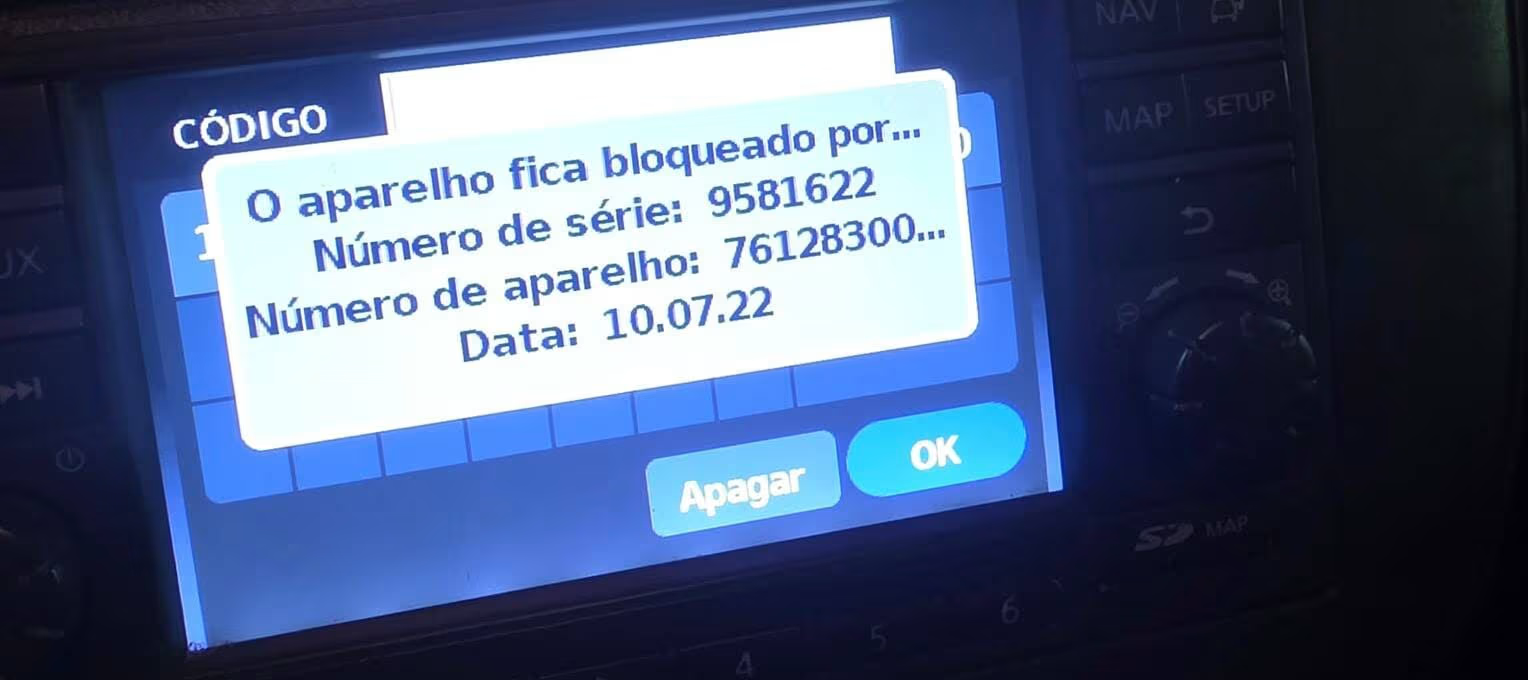
If your X-Trail has an LCN, Connect or Bosch navigation unit, you don’t need to touch a single screw. Switch the radio on, then enter any incorrect 4-digit code three times in a row — 1-2-3-4 works fine. On that third wrong attempt, the screen locks itself for about an hour and lays out the serial number, device number (sometimes labelled part number) and date all in one go.
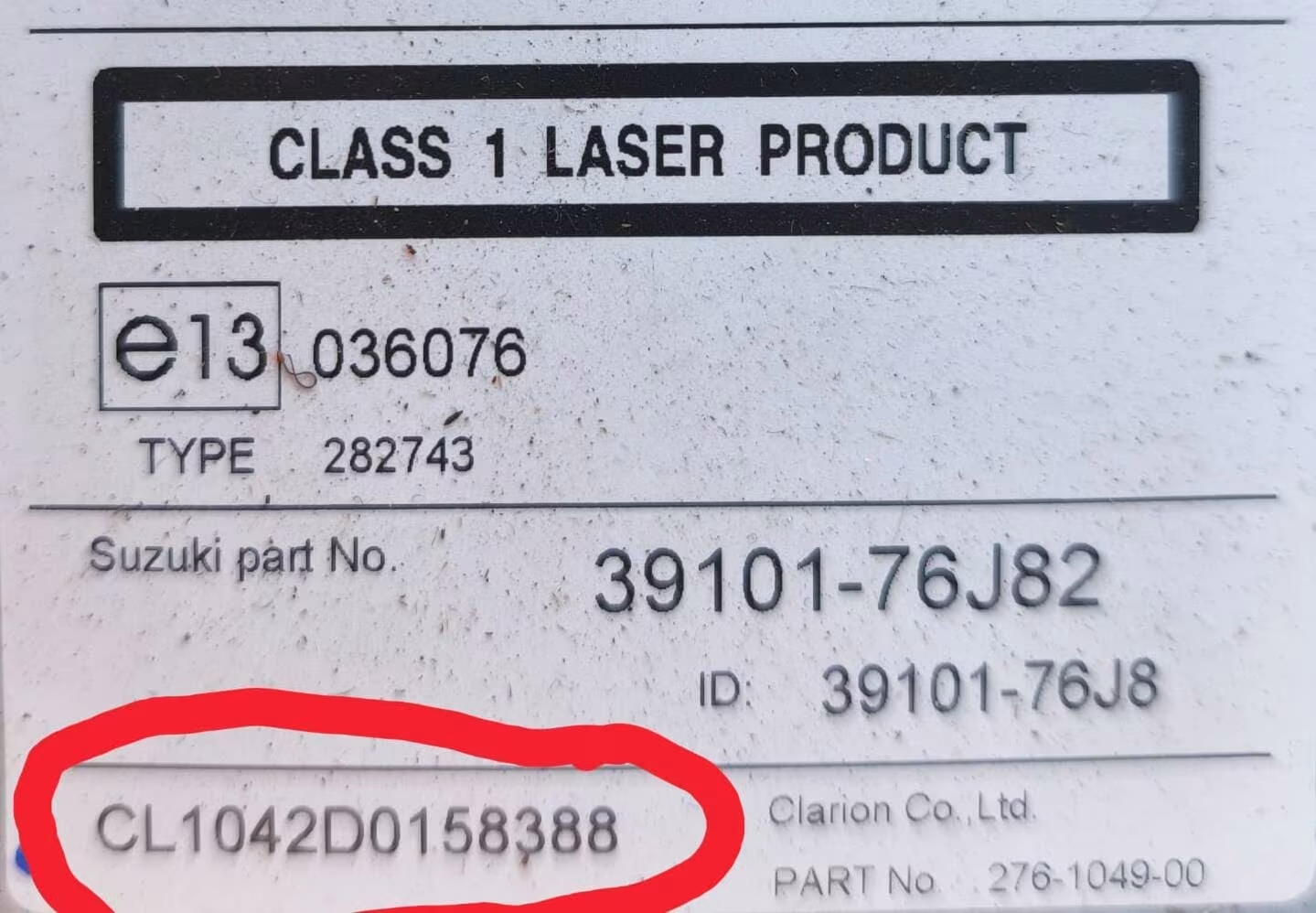
Clarion units, unfortunately, don’t offer that shortcut at all — there’s simply no on-screen route for them. In that case the radio needs to come out: disconnect the battery first for safety, pry off the trim around the unit with a plastic trim tool, remove the mounting screws, then slide the radio forward to reveal the barcode label on its back or side.
A Quick Note on the Date Shown On Screen
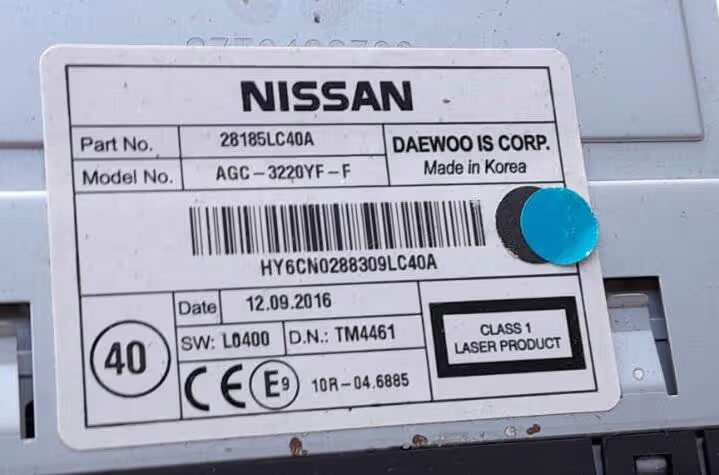
In most cases, the date that appears on the lockout screen matches the date printed on the radio label. On some Daewoo-based units, though, the two can differ slightly — if that happens, always go with the date shown on screen, since that’s the one the code generation actually uses.
Common Nissan X-Trail Serial Number Examples
These are examples only, but your X-Trail’s radio serial should follow a similar shape depending on the unit fitted. Always copy the serial exactly as shown.
Nissan X-Trail Generations We Cover
Whichever X-Trail you’re driving, the radio type fitted matters more than the exact production year.
X-Trail T30 (2001-2007)
Mostly fitted with Clarion or Blaupunkt factory radios using label serials.
X-Trail T31 (2007-2013)
Introduced LCN navigation, which can show its details on screen.
X-Trail T32 (2013-present)
Mostly Nissan Connect and Bosch systems with the same screen-based lockout.
How It Works
How to Enter the Nissan X-Trail Radio Code
Switch the radio on until “CODE IN” appears. Press preset button 1 repeatedly until the first digit shows correctly, then button 2 for the second digit, button 3 for the third, and button 4 for the fourth. Once all four digits match, confirm by pressing and holding button 6, the TA button, or the seek control for around 10-15 seconds, depending on your exact unit.
Take it slow here — the wait times stack up quickly with wrong attempts. Three failed tries trigger roughly a 1-hour lockout, six tries pushes that to 12 hours, and nine tries means a full 24-hour wait. Enter the code ten times incorrectly and the radio locks completely, needing a dealer visit to reset, so it’s worth double-checking every digit before confirming.
Nissan X-Trail Radio Code FAQ
Can I get my Nissan X-Trail radio code online?
Yes. Most X-Trail radio codes can be recovered online using the serial number, whether it comes from the radio label or from the on-screen lockout display.
Where is the serial number on a Nissan X-Trail radio?
On Clarion and Blaupunkt units the serial is printed on a label on the back or side of the radio, visible once the unit is removed from the dashboard. On X-Trail models with LCN, Connect or Bosch systems, the details appear on the screen instead, without removing anything.
How do I display the serial number on an X-Trail LCN or Connect radio?
Switch on the radio, then enter any incorrect 4-digit code three times in a row, for example 1-2-3-4. On the third wrong attempt, the screen locks for around 60 minutes and displays the serial number, device number (or part number) and date needed to generate your code.
Can Clarion X-Trail radios show the serial on screen too?
No. Clarion units don’t support the on-screen method at all, so the radio has to be removed from the dashboard to read the serial printed under the barcode on the side label.
The date on screen looks different from the date on my radio label. Which one is correct?
Use the date shown on screen. On some Daewoo-based units the on-screen date can differ slightly from the one printed on the label, and only the on-screen version works for generating the code.
What happens if I keep entering the wrong code?
The lockout period gets longer with each round of failed attempts — roughly a 1-hour wait after 3 wrong tries, 12 hours after 6, and 24 hours after 9. Repeated failures beyond that can lock the unit completely, at which point only a dealer can reset it, so it’s best to confirm the correct code before entering it.