Nissan Qashqai Radio Code by Serial Number
Locked Qashqai radio after a flat battery, battery change or a radio that has been removed from the dashboard? Recover your Nissan Qashqai unlock code online using the serial number from the label or from the on-screen lockout display.
Covers Nissan Qashqai factory units including Clarion, Blaupunkt and Nissan Connect Bosch LCN EU, fitted across the J10 (2007-2013) and J11 (2013-2021) generations.
Get Your Qashqai Radio Code
Nissan radio · Not a Nissan? Change the make
Use the serial number from your radio label, or the serial, device number and date shown on screen after a lockout.
Nissan Qashqai Radio Code Service
Nissan fitted several different factory radio brands across the Qashqai range, so the way you find your details changes depending on the unit. Clarion and Blaupunkt radios show a printed serial on a label, while Nissan Connect Bosch LCN EU systems reveal their details directly on the screen once the unit locks itself.
Because the format differs so much from one radio to another, it helps to check which type is fitted in your Qashqai before ordering, so the correct serial is used the first time.
Clarion Qashqai Radios
Common on many Qashqai J10 and early J11 models.
- CL serial numbers
- PN serial numbers
- PP serial numbers
Blaupunkt Qashqai Radios
Blaupunkt units usually show a BP serial on the radio label.
- BP + 12 characters
- Printed above the barcode
- Found on the side label
Nissan Connect / Bosch
Newer Qashqai Connect systems display details on screen.
- Serial number
- Device number
- Date shown on screen
How to Find Your Nissan Qashqai Radio Serial Number
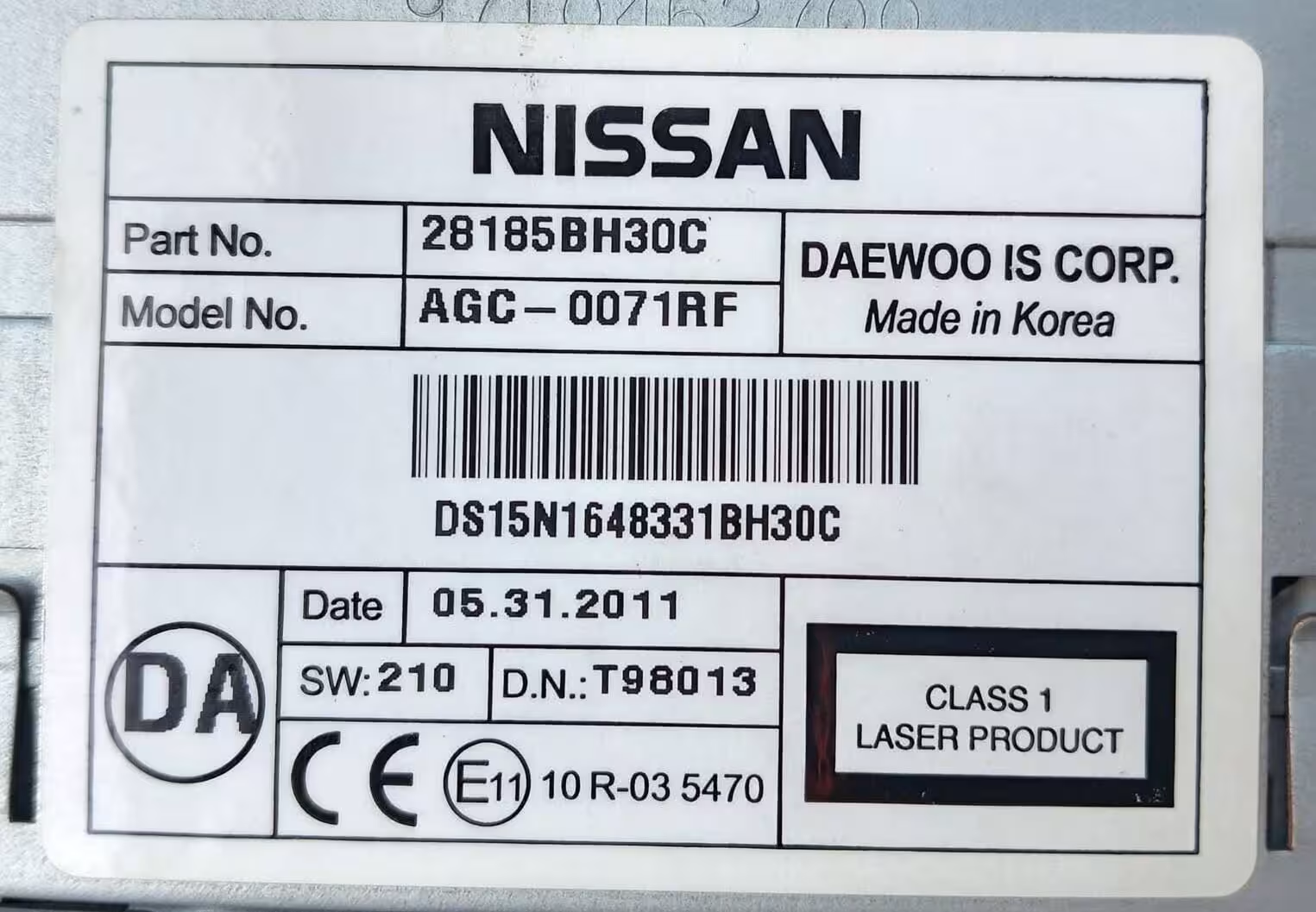
On Clarion and Blaupunkt units, the radio usually needs to be released from the centre console using release keys or by gently prising it forward, so the label on the back or side can be read. On Nissan Connect Bosch LCN EU systems, the details appear on screen instead, without removing anything.
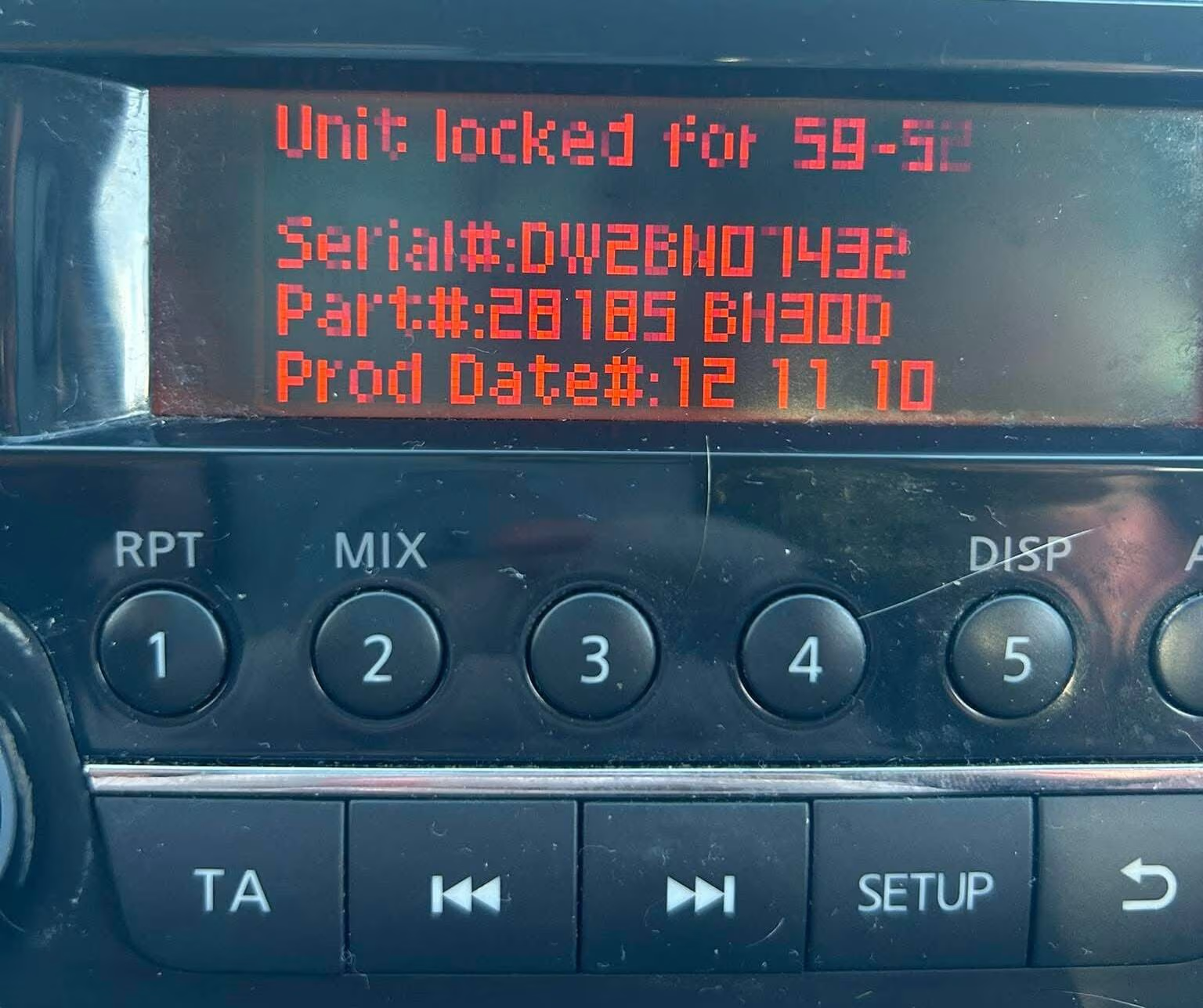
Nissan Connect Bosch LCN EU (Qashqai)
For Nissan Connect systems, turn the ignition to the ACC position and switch on the radio without starting the engine. Enter any incorrect 4-digit code three times, for example 0000. The screen will show “SYSTEM LOCKED” for around 60 minutes, along with the serial number, device number and date.
Write down all three details exactly as shown, since all of them are needed to generate the correct Nissan Qashqai radio code. Only the serial shown on screen works for these units — the label on the back of the radio is not used for Connect systems.
Common Nissan Qashqai Serial Number Examples
These are examples only, but your Qashqai radio serial should follow a similar format depending on the unit fitted. Always copy the serial exactly as shown.
Nissan Qashqai Generations We Cover
Our online service supports the factory radios fitted across both generations of the Nissan Qashqai, as the radio type — not the exact model year — determines the recovery process.
Qashqai J10 (2007-2013)
Commonly fitted with Clarion or Blaupunkt factory radios using label serials.
Qashqai J11 (2013-2021)
Mix of Clarion, Blaupunkt and early Nissan Connect systems depending on trim.
Qashqai Connect Systems
Later Nissan Connect Bosch LCN EU units display details on screen after lockout.
How It Works
How to Enter the Nissan Qashqai Radio Code
Switch on the radio until “CODE IN” appears on the display. Press button 1 repeatedly until the first digit of your code is shown, then button 2 for the second digit, button 3 for the third digit and button 4 for the fourth digit.
Once all four digits are correct, confirm the code by pressing and holding the relevant preset button or the OK/ENTER control, depending on your exact radio model. Avoid entering random digits, since repeated wrong attempts can extend the lockout period.
Need a visual guide?
This short video shows how to enter a 4-digit security code on a factory Nissan radio, including Qashqai units.
Watch Nissan Radio Code VideoExternal YouTube tutorial showing how to enter a Nissan radio security code.
Nissan Qashqai Radio Code FAQ
Can I get my Nissan Qashqai radio code online?
Yes. Most Nissan Qashqai radio codes can be recovered online using the serial number, whether it comes from the radio label or from the on-screen lockout display.
Where is the serial number on a Nissan Qashqai radio?
On Clarion, Blaupunkt and Daewoo units the serial is printed on a label on the back or side of the radio, visible once the unit is released from the dashboard. On Nissan Connect Bosch LCN units it appears on the screen after a lockout is triggered.
How do I display the serial number on a Nissan Connect Qashqai radio?
Turn the ignition to ACC and switch on the radio, then enter any incorrect 4-digit code three times. The screen will lock for around 60 minutes and display the serial number, device number and date, which are needed to generate the code.
What does a Nissan Qashqai radio serial number look like?
Formats vary by manufacturer: Clarion serials often start with CL, PN or PP, Blaupunkt serials start with BP, and Daewoo or Connect units use serials starting with DW or DS, typically followed by 14 to 18 characters.
Does this work for both the J10 and J11 Qashqai?
Yes. We cover the J10 (2007-2013) and J11 (2013-2021) generations, as well as later Qashqai models, since the process depends on the radio unit fitted rather than the exact model year.
What if my Qashqai radio is already locked out?
Leave the ignition and radio switched on until the lockout period ends, then note down the serial number, device number and date shown on the screen so the correct code can be generated.
Get Your Nissan Qashqai Radio Code Today
Enter your Qashqai radio serial number and recover your code online without visiting a dealer.
Search Qashqai Radio Code