If your Honda radio displays CODE, ENTER CODE, or is locked after a battery replacement or power failure, you can recover your original unlock code online using the radio serial number.
We generate codes for Honda audio units and Honda Navi systems fitted to the Civic, Accord, CR-V, Jazz, HR-V and more. Just enter the serial number from the display or from the label on the unit.
Get Your Honda Radio Code
Enter your Honda radio serial number below:
Honda radio · Not a Honda? Change the make
How to find your Honda radio serial number
Getting your Honda radio serial is quick. On most models from 2002 onward, you can display the serial directly on the screen without removing the unit. On navigation units and older models, the serial is printed on the label of the unit.
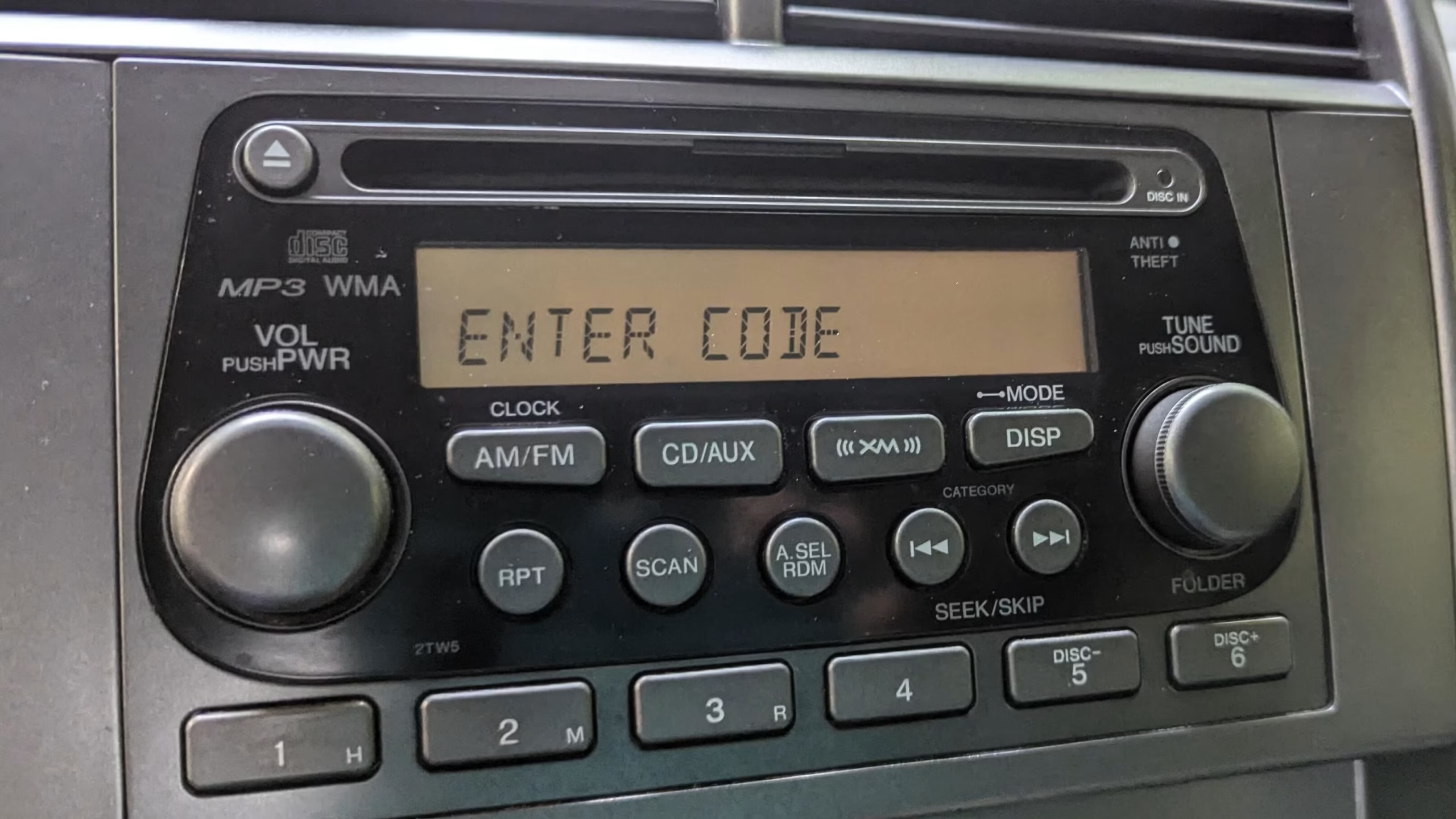
Example of a Honda radio display locked and asking for the unlock code.
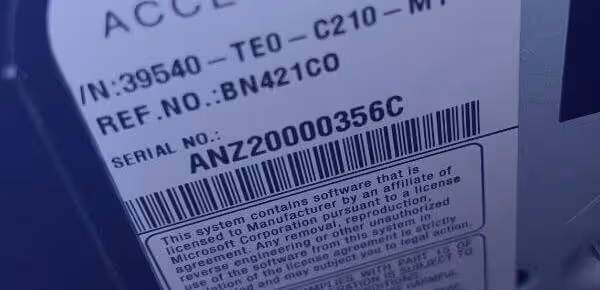
Example of a Honda Navi unit showing the serial number on its label.
Method 1: On-Screen (1 + 6)
Turn the ignition ON and switch the radio off. Hold preset buttons 1 and 6, then switch the radio on while still holding them. The display alternates between a U part and an L part. Ignore the letters and join the digits (e.g. U2200 + L0055 = 22000055).
Method 2: Honda Navi Unit
On Honda navigation systems, the serial number is printed on the label of the Navi unit, as shown in the photo above. If you can’t reach the label, send us a photo of your unit and we’ll help you find it.
Method 3: Check the Label
If the screen doesn’t show the serial, or your Honda is an older model, the serial is on the sticker on the radio itself. You may need to remove the unit from the dashboard. Some cars also have a serial sticker inside the glovebox.
Why does your Honda radio lock?
Honda vehicles feature an anti-theft security system built into the audio equipment. If electrical power to the radio is interrupted, such as when replacing the battery, after a jump-start, or if a fuse blows, the system locks itself automatically.
This is a standard security feature to deter theft. Entering the correct unlock code restores full stereo function immediately. Avoid guessing randomly: repeated wrong entries can lock the radio for a period of time.
Honda radio models supported
Our database covers factory-fitted audio and navigation systems across the Honda range:
- Honda Civic
- Honda Accord
- Honda CR-V
- Honda Jazz
- Honda HR-V
- Honda FR-V
- Honda Legend
- Honda Insight
- Honda Navi Systems
- Honda CD & MP3 Audio Units
Check our dedicated guides for Volkswagen, SEAT, Audi or Mercedes.
Where to find your Honda serial number
Depending on the year and the unit fitted in your Honda, you will find the serial number in one of these places:
On the display
Most Honda audio units from 2002 onward show the serial as a U part and an L part when you hold buttons 1 and 6.
On the Navi label
Honda navigation units carry the serial number on a label on the unit itself.
In the glovebox
Some Honda vehicles have a sticker in the glovebox that lists the radio serial number.
1. Turn the ignition ON (do not start the engine) and switch on the radio until the display shows
CODE.2. Press the preset button that matches each digit of your code. Honda codes are usually 5 digits, and each digit is a preset button from 1 to 6.
3. For example, if your code is 11143, press button 1 three times, then button 4, then button 3.
4. The radio unlocks after the last digit is entered.
Why choose RadioCodePro?
No Dealer Trips
Skip the dealer appointment and the hassle of taking time out of your day just to unlock your Honda’s stereo.
Fast Email Delivery
Enter your serial, place your request safely online, and receive your guaranteed code direct to your inbox.
Expert Support
If you’re having trouble locating or reading your serial label, send us a photo and our technical team will help.
Honda radio code FAQ
How do I find the serial number of my Honda radio on-screen?
Turn the ignition ON without starting the engine and switch the radio off. Press and hold preset buttons 1 and 6, then switch the radio on while still holding them. The display alternates between a U part and an L part. Ignore the letters and join the digits to get the full 8-digit serial number.
Where is the serial number located if it doesn’t show on screen?
If the 1 + 6 shortcut doesn’t work, or your Honda is an older model, check the sticker on the radio or navigation unit itself. You may need to remove the unit from the dashboard. Some vehicles also have a sticker with the serial number inside the glovebox.
How long is a Honda radio code?
Honda radio codes are usually 5 digits long, and each digit corresponds to one of the preset buttons on the radio (1 to 6).
How do I enter the unlock code into a Honda radio?
Turn the ignition ON and switch on the radio until the display shows CODE. Then press the preset button that matches each digit. For example, if your code is 11143, press button 1 three times, then button 4, then button 3. The radio unlocks after the last digit.
What should I do if my Honda radio keeps saying CODE or ENTER CODE?
This means the anti-theft system has locked the unit, usually after a battery change or power loss. Do not guess random codes, because repeated wrong entries can lock the radio for a period of time. Get your serial number and retrieve the correct code instead.