Audi Radio Code by Serial Number
Get Your Audi Radio Code Without a Dealer Visit
Battery gone flat, had some work done under the dash, or the display’s been stuck on SAFE since you picked up a secondhand Audi? The unlock code can almost always be recovered from the AUZ serial number printed on the unit or shown on screen — no dealer booking, no service department markup.
This applies across Chorus, Concert and Symphony head units, as well as the RNS-E navigation system, fitted throughout the Audi range from the A1 up to the A8 and beyond.
Enter Your Audi Serial Number
Use the AUZ serial from the radio label, or from the bottom of the screen if you have an RNS-E unit.
Check My Audi SerialTip: on RNS-E units, the serial appears along the bottom edge of the screen — no removal needed.
How to Find Your Audi Radio Serial Number
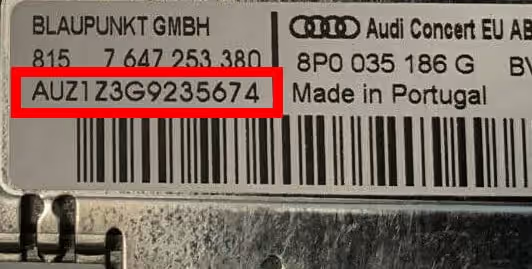
Chorus, Concert and Symphony units all follow the same routine. Push a pair of radio release keys into the corner holes of the fascia and apply gentle outward pressure — the unit slides forward on its own, with no wires to disconnect. Once it’s out, look on the back or side of the casing for a label (or an engraving) showing a 14-character serial starting with AUZ, such as AUZ2Z3C1420538.
If your Audi has the RNS-E navigation unit instead, you can skip the removal entirely. Just switch the radio on and look along the bottom of the display — the same AUZ-format serial shows right there, and on RNS-E units specifically, the sixth character is always the number 7.
One thing worth double-checking when copying the serial: a capital I and the digit 1 look almost identical on some labels, and mixing them up is a common reason a code doesn’t work first time.
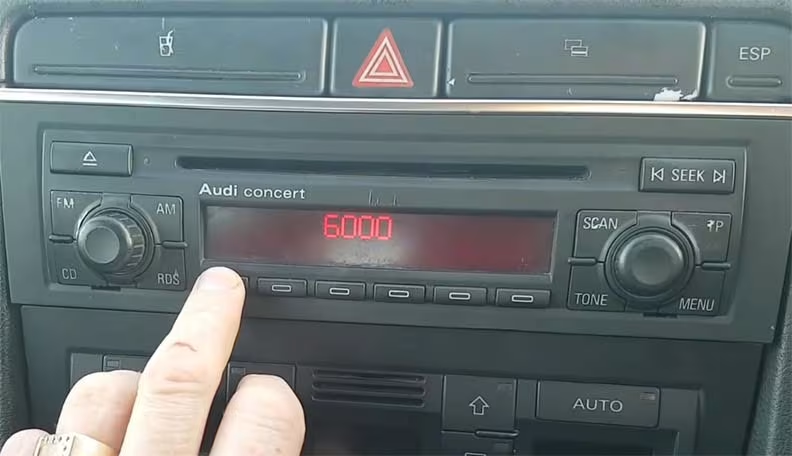
Audi Radio Units We Cover
Audi fitted a handful of different factory systems over the years. Whichever one is in your car, the AUZ serial number is the detail that matters.
Why Does the Audi Radio Ask for a Code?
This is Audi’s factory anti-theft behaviour, not a fault. The moment power is cut — from a disconnected battery, a flat battery, a jump start, or dashboard work — the unit locks itself, shows SAFE, and refuses to play until the original code is entered again.
If the display shows SAFE 2 instead, that simply means a few too many wrong attempts have already been made. Rather than continuing to guess, leave the radio powered on for about an hour — the lockout clears on its own, and you can try the correct code once you have it confirmed.
Worth knowing: if the label on the casing looks torn along a seam, or the panels don’t quite line up, the radio may have been repaired or re-labelled before — it’s still worth trying the serial you can read, but let us know if the code doesn’t match.
Common Audi Serial Number Examples
These are examples only, but your Audi’s serial should follow the same AUZ format. Always copy it exactly as shown, since one wrong character produces a different code.
How It Works
Find the serial
Check the radio label for Chorus, Concert and Symphony units, or read it off the screen for RNS-E.
Enter it online
Type your AUZ serial exactly as shown, for example AUZ2Z3C1420538.
Receive your code
Your Audi radio code is emailed to you, with simple instructions for entering it.
Entering the Code on Your Audi
With the ignition on, the display should show SAFE, then 1000. If it doesn’t move on its own, press and hold two buttons together — commonly RDS and SCAN, or RDS and AS, depending on your exact unit — until 1000 appears.
From there, use the preset buttons to set each digit: press button 1 repeatedly for the first digit, button 2 for the second, and so on through buttons 3 and 4. Each press cycles the number up by one, so keep pressing until the digit you need shows. Once all four are correct, confirm with the same button combination used earlier, and the radio should unlock straight away.
Audi Radio Code FAQ
Where do I find my Audi radio serial number?
On Chorus, Concert and Symphony units, the serial is on a label on the back or side of the casing, visible once the radio is slid out using release keys. On the RNS-E navigation unit, the serial appears along the bottom of the screen when the radio is switched on, so nothing needs removing.
What does an Audi radio serial number look like?
It always starts with AUZ and is 14 characters long, for example AUZ2Z3C1420538. On RNS-E units, the sixth character is always the number 7.
Do I need to remove the radio to get the code?
For Chorus, Concert and Symphony units, yes — a set of release keys pushed into the corner holes is enough to slide it forward, with no wires to disconnect. RNS-E owners can skip this entirely and read the serial straight off the screen.
Why is my Audi radio showing SAFE?
SAFE is the standard message Audi factory radios show once they’ve lost power, whether from a flat battery, a battery change, or a repair. It’s normal anti-theft behaviour rather than a fault, and entering the correct code brings the radio straight back.
What if my Audi radio shows SAFE 2 or won’t accept the code?
SAFE 2 means too many incorrect attempts have been made. Leave the radio switched on for about an hour without entering anything else, and it should accept a fresh attempt afterwards.
Which Audi radio units does this cover?
We cover Chorus, Concert, Symphony and RNS-E navigation units fitted across the Audi range, including A1, A2, A3, A4, A5, A6, A8, TT and Q models.