Get Your Car Radio Code Online In Minutes
Locked out after a flat battery or a new radio unit? No problem — simply enter your serial number below. Afterwards, request your code online, since no dealer appointment is needed.
Supported Car Brands
RadioCodePro helps drivers unlock a car stereo using its original serial number. Often, this happens after a flat battery, a new unit, or a second-hand car with no handbook.
Choose Your Brand
Each brand below links to a full guide. There, you’ll find clear steps for locating your serial number and getting the matching code for your exact model.
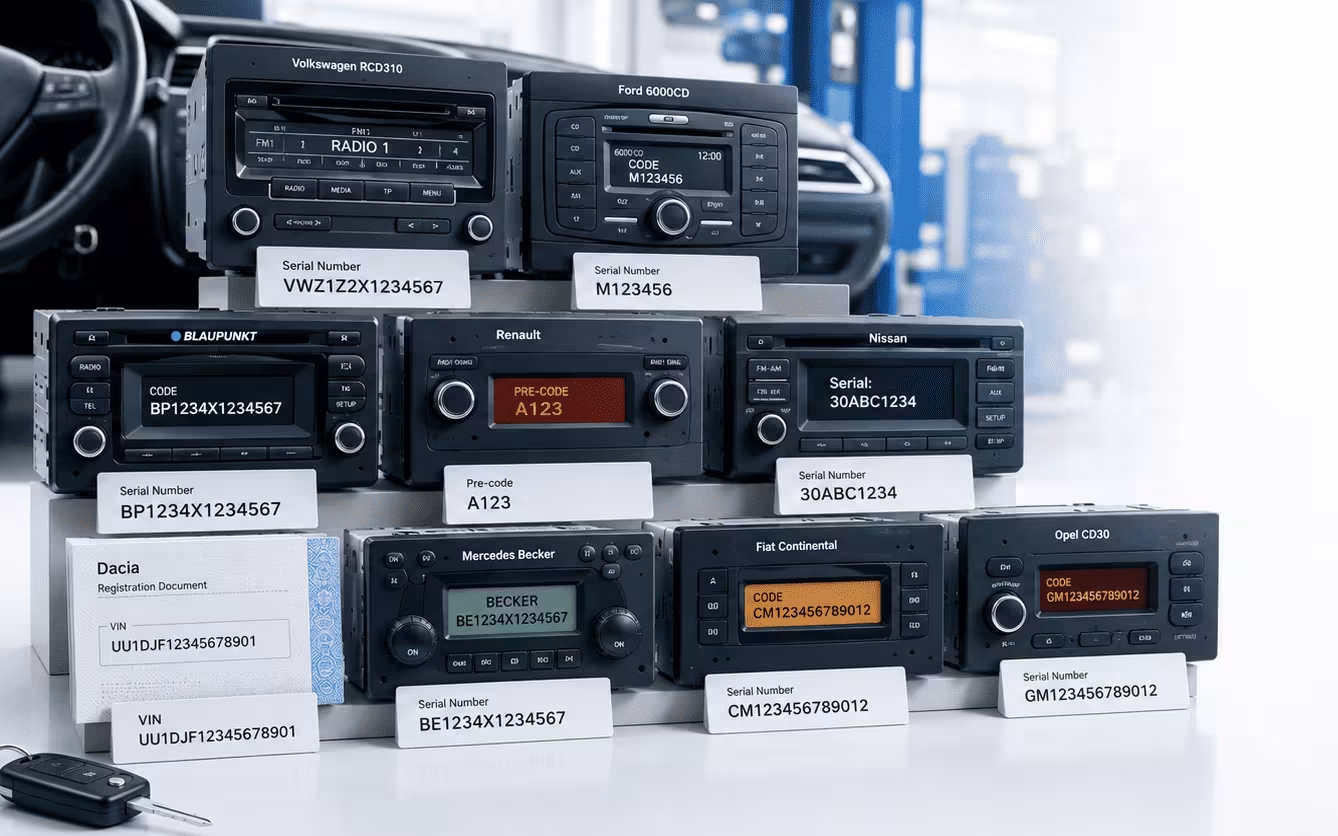
Every Radio Has Its Own Serial Number
Each manufacturer prints its serial number in a different spot. VW units, for instance, often show a code starting with VWZ. Renault and Dacia radios, on the other hand, use a short pre-code instead.
Since the format changes from brand to brand, we sometimes ask for a photo if you’re unsure. That way, you avoid submitting the wrong details and get the correct code on the first try.
Simple From Start to Finish
You only need one thing: your radio serial number. Once you submit it, complete your order and wait for the code by email.
No Dealer Visit Needed
Dealers can be slow and costly, especially when they require an appointment. Our service, however, gives you a faster online option.
Made for Common Vehicles
Many stereo systems are supported here, including both factory-fitted units and replacement radios.
How It Works
Find the Serial Number
Check the radio screen, side label or top label first. This detail helps us identify your correct code.
Submit Your Request
Enter the serial number above, then complete the secure checkout. Double-check it before submitting.
Receive It by Email
We send your code straight to your inbox once it’s ready. Keep it saved in case your radio asks for it again.
Car Radio Code Prices
Check our starting prices for popular car radio code services. The exact cost depends on the vehicle brand, radio model and serial number, and it is always shown before you complete checkout.
Volkswagen Radio Code
Prices from £17.99For supported VW factory radios using a valid VWZ serial number.
Ford Radio Code
Prices from £9.99For supported Ford 6000CD, Sony and TravelPilot radio serial formats.
Renault Radio Code
Prices from £9.99For supported Renault radios using the serial number or security pre-code.
Dacia Radio Code
Prices from £9.99For supported Dacia units using a security code, serial number or VIN route.
Nissan Radio Code
Prices from £14.99For supported Nissan radios using the display details or radio label information.
Mercedes Radio Code
Prices from £14.99For supported Becker, Bosch and Audio 20 factory-fitted radio units.
Fiat Radio Code
Prices from £12.99For supported Fiat Blaupunkt, Bosch, Visteon and Continental radios.
Vauxhall Radio Code
Prices from £9.99For supported Vauxhall and Opel factory radios, including selected CD30 units.
When Do You Need This?
Common Causes
A car stereo often asks for a code once its power supply gets interrupted. This can, for example, happen after a battery swap, an electrical repair, or a used unit fitted into a different car. Likewise, buying a second-hand vehicle without the handbook can trigger the same lock.
Warning Signs on Screen
Does your screen show “CODE”, “SAFE” or “LOCKED”? That usually means your unit needs its security code before it will play again. So, simply grab your serial number and start your request above.
Secure Checkout
An encrypted, secure checkout processes your payment and personal details.
Verified Process
Before the matching code is issued, every request is checked against the serial number.
Money Back Guarantee
Can’t retrieve a valid code for your unit? Then you get a full refund, no questions asked.
Real Human Support
Unsure about your serial number? Our support team will gladly help you identify it first.
Questions Before Ordering
Where can I find the serial number?
It usually sits on the radio label or the metal casing, though some models show it on the screen instead.
Do I need to visit a garage?
Not in most cases. As long as you have the correct serial number, you can request the code online.
What if I enter the wrong serial?
A wrong serial leads to a wrong code, so double-check it before ordering. When unsure, a clear photo of the label helps avoid mistakes.
Is my information kept secure?
Absolutely. Every request goes through a secure checkout, and we only use your details to find and deliver your code.
Ready to Unlock Your Radio?
Thousands of drivers already got their radio working again, without a single dealer visit. So, now it’s your turn — enter your serial number above and get started in minutes.