Jeep Radio Code by Serial Number
Get Your Jeep Radio Code Without a Dealer Visit
Swapped batteries, fitted a used head unit, or your Uconnect screen is simply refusing to move past “Enter Code”? The Jeep radio code can almost always be recovered from the unit’s own serial number, so you don’t have to book a dealer slot and hand over proof of ownership just to get your stereo working again.
This covers everything from older Alpine and Panasonic factory units to modern Uconnect 3.0 through 12 systems, fitted across the Wrangler, Cherokee, Grand Cherokee, Renegade, Compass and more.
Enter Your Jeep Radio Serial Number
Use the serial from your Uconnect system settings, or the label on the back of an older unit.
Jeep radio · Not a Jeep? Change the make
Tip: on Uconnect systems, go to Settings → System Information (or About) to view the serial on screen.
How to Find Your Jeep Radio Serial Number
If your Jeep has a newer Uconnect system, fitted from around 2017 onwards, you can usually see the serial without touching a single screw. Open the menu, go to Settings, then look for System Information or About — the serial should be listed right there on the screen.
Older Jeep radios don’t offer that shortcut. In that case, the unit needs to come out of the dashboard so you can read a barcode sticker marked S/N, usually on the rear or top of the casing. It’s worth taking your time here — the label can also list a part number and other codes, so make sure you’re copying the serial line specifically, not the VIN or part number underneath it.
Common mix-up to avoid: the VIN identifies your vehicle, not your radio. Only the radio’s own serial number can generate the correct unlock code, so double-check you’re not sending us the chassis number by mistake.
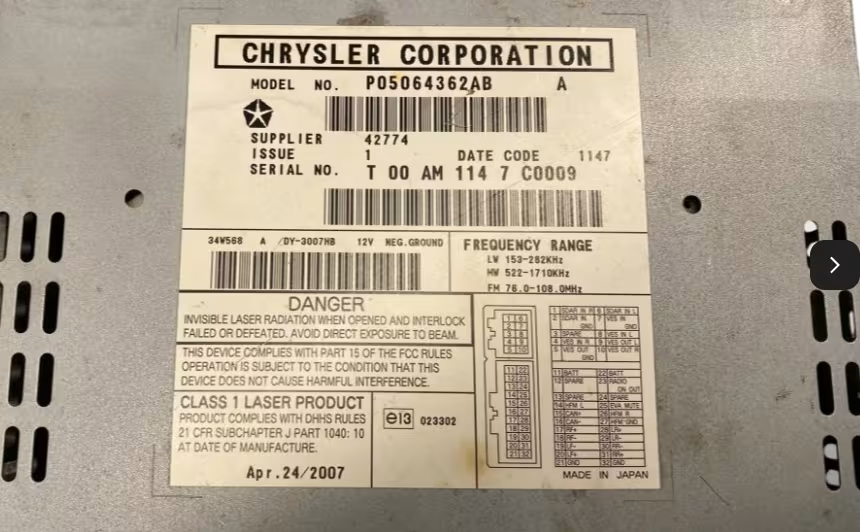
This Jeep Patriot radio serial number starts with T00M.
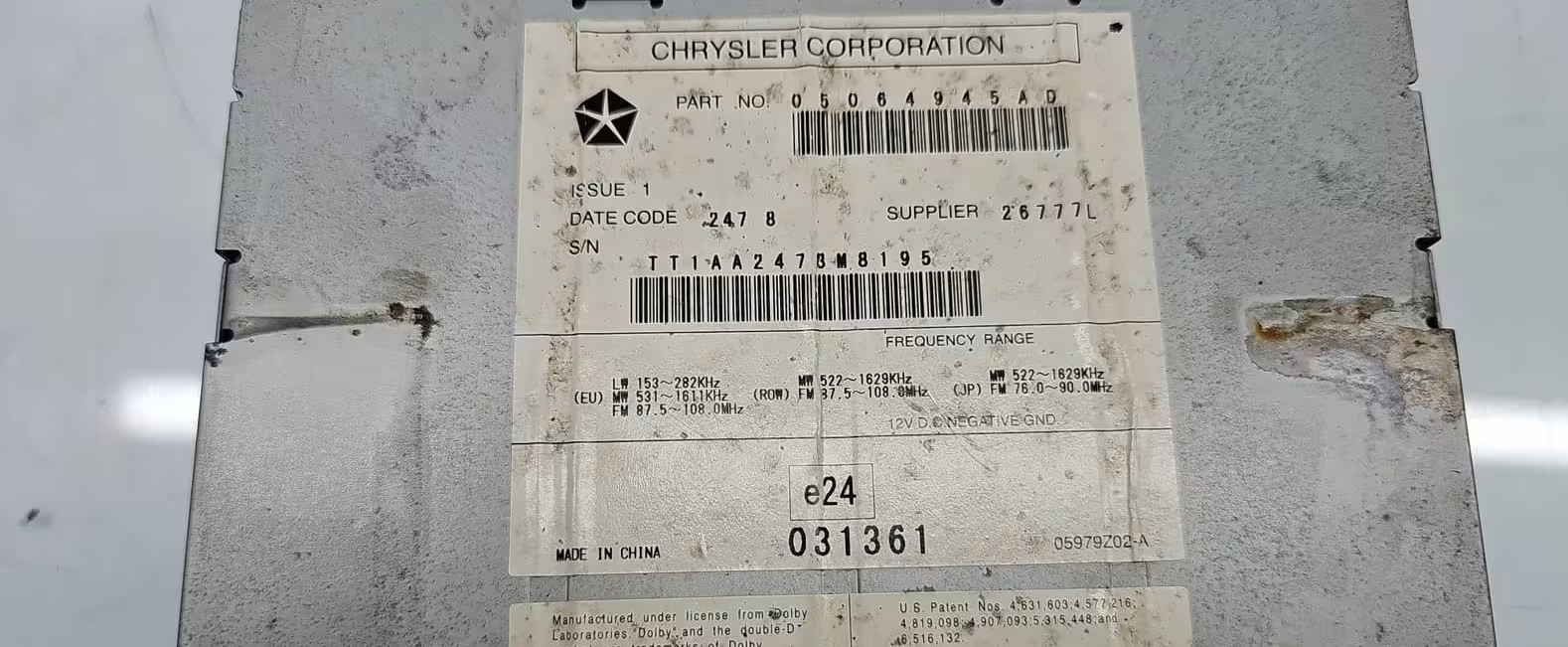
This Jeep radio serial number starts with TT1A.
Common Jeep Radio Serial Number Examples
Formats vary quite a bit depending on the radio brand and generation fitted to your Jeep. These are just examples — your own serial will be unique to your unit.
Why Does the Jeep Radio Ask for a Code?
Stellantis — the parent company behind Jeep, Chrysler, Dodge and RAM — builds anti-theft protection into its Uconnect and factory radio systems. The moment the unit loses power, whether from a flat battery, a replacement, or simply being removed, it locks itself as a safeguard against theft and won’t play until the correct 4-digit code is entered again.
Worth knowing if you’ve bought a used radio or swapped one between Jeeps: the code is tied to that specific radio, not the car it’s currently sitting in. So if you’ve moved a unit from one Jeep to another, the original code should still apply — though a few Uconnect systems are additionally paired to a particular vehicle, in which case we may need both the serial and your Jeep’s details to sort it out.
Jeep Radio Systems We Cover
Jeep has used a wide mix of factory audio brands over the years. Whichever one is fitted to yours, the serial number is the detail that matters.
Jeep Models We Can Help With
Our lookup service covers the factory radios fitted across popular Jeep models sold in the UK and Europe.
How It Works
Find the serial
Check Uconnect Settings → System Information, or the label on the radio casing for older units.
Enter it online
Type your Jeep radio serial exactly as shown, avoiding the VIN or part number.
Receive your code
Once processed, your Jeep radio code is sent by email with simple entry instructions.
Entering the Code on Your Jeep Radio
Once your code arrives, switch on the radio until it shows CODE or ENTER CODE. On most factory units, you enter each digit using the preset buttons — for a code of 1234, that means pressing preset 1, then 2, then 3, then 4 in sequence. Many Uconnect and Harman systems confirm automatically once the last digit is entered, while some older Continental and Delphi units may need you to hold the ON/VOL control briefly first.
If the screen still shows CODE after entering it correctly, double-check that the digits were entered with the right preset buttons and in the right order before trying again.
How to Enter Your Jeep Radio Code
Watch this short video to see how to enter your Jeep radio code:
Jeep Radio Code FAQ
Where do I find my Jeep radio serial number?
On Uconnect systems from 2017 onwards, go to Settings, then System Information or About, and the serial should be listed on screen. On older Jeep radios, the unit needs to be removed from the dashboard to read the serial label marked S/N on the back or top.
What does a Jeep radio serial number look like?
Formats vary by unit. Common examples include T00AM394958584, TM9123456789, and A2C94848489393 on newer Uconnect systems.
Is the VIN the same as the radio serial number?
No. The VIN identifies your vehicle, while the radio serial identifies the specific unit. Only the radio serial number can be used to generate the correct unlock code.
I moved my radio to a different Jeep. Will the old code still work?
The unlock code is tied to the individual radio unit, not the vehicle, so it should still be valid. However, some Uconnect systems are additionally paired to a specific vehicle, so if the code doesn’t work, contact us with both the radio serial and the new vehicle’s details.
Which Jeep radio systems does this cover?
We cover Uconnect 3.0, 4.3, 5.0, 8.4 and 12-inch systems, along with older Alpine, Panasonic, Harman, Continental and Delphi factory units fitted to Jeep vehicles.
Why does my Jeep radio ask for a code?
It’s a built-in anti-theft feature. Whenever the unit loses power or is removed, it locks itself and requires the original 4-digit code before it will work again.
Get Your Jeep Radio Code Today
Enter your radio serial number and recover your Jeep unlock code online, without the wait or the dealer markup.
Search Jeep Radio Code