Dacia Duster Radio Code Online by VIN Number or Security Code
Is your Duster’s factory radio locked and showing “CODE” on the display after a battery disconnect, jump start, flat battery or new stereo installation? You can unlock it in minutes by submitting your vehicle’s VIN number or the security code printed on the radio unit itself.
Every Duster built on the Dacia platform carries a VIN that typically begins with UU1, for instance UU1KSDK0382075022. Older or replacement head units may instead display a short pre-code such as G487, printed directly on the radio label.
Get your Duster unlock code
Type in your Duster’s VIN number or the short security code from the radio sticker.
Dacia radio · Not a Dacia? Change the make
Locating the VIN or security code on a Dacia Duster
Duster owners can unlock the stereo in two ways: either through the car’s VIN number, or through a short code printed on the radio itself once it has been pulled from the dash. If your registration documents are to hand, the VIN route is usually the fastest — Duster VINs start with UU1 in almost all cases.
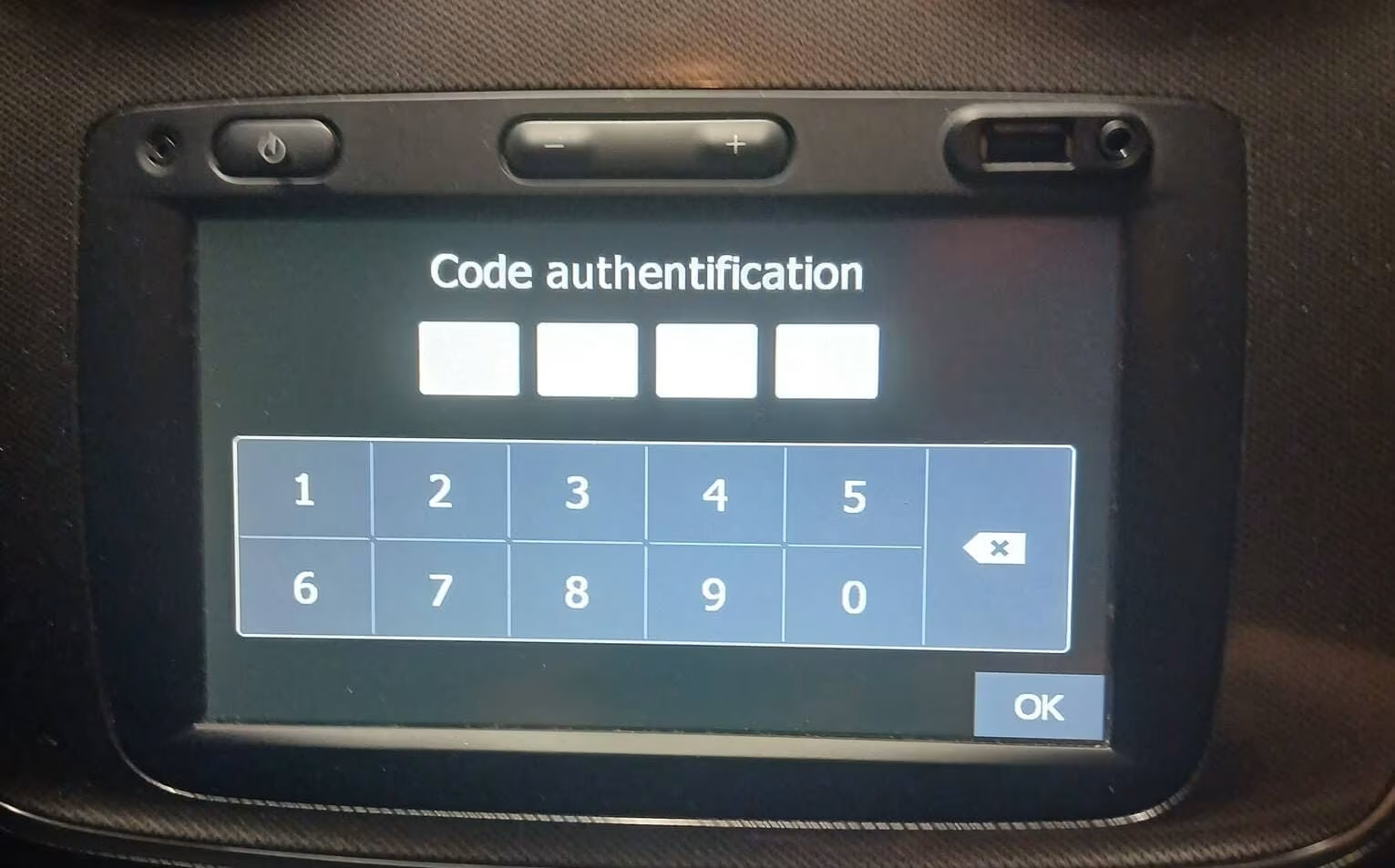
A locked Duster head unit displaying “CODE” after losing power — this is normal and simply needs the correct unlock code.
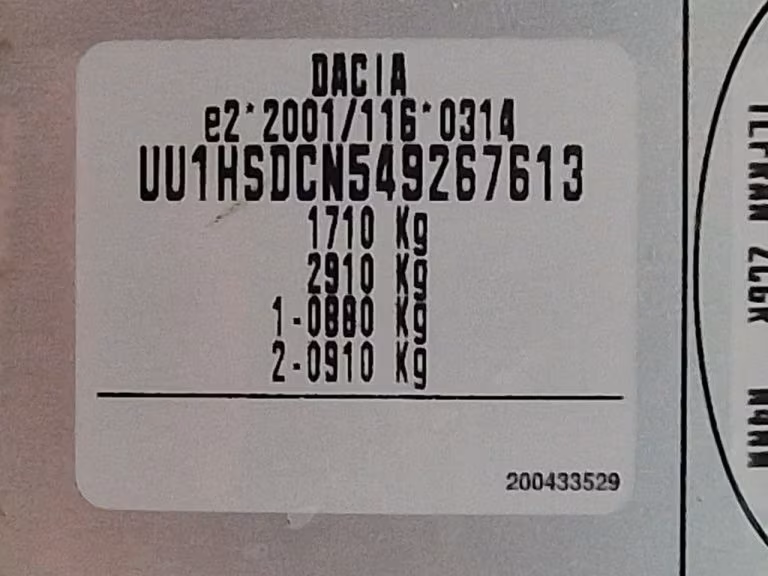
Sample Duster VIN plate — note the UU1 prefix used across the Dacia range.
Read the VIN plate
Look on the V5C/registration document, the windscreen base or the driver’s door pillar of your Duster.
Pull the radio label
With the head unit removed, check the top or side sticker for a short 4-character security code.
Double-check every digit
A single mistyped character in the VIN or code will return the wrong unlock code, so copy it carefully.
Why does the Duster stereo lock itself?
Factory-fitted Duster stereos come with built-in anti-theft protection. The moment power is cut — from a disconnected battery, a dead battery, a jump start, dashboard work or a swapped head unit — the radio locks itself and asks for a code the next time it’s switched on.
There’s nothing actually wrong with the unit; it’s a security feature, not a fault. Once the correct code is entered, the radio wakes up and works exactly as before.
Because Dacia sits under the Renault group, many Duster head units share the same architecture as Renault radios — which is why some models use a short pre-code sticker while others are matched purely by VIN.
Unlocking a Duster radio with the VIN number
Don’t want to pull the radio out of the dashboard? The VIN number is usually enough on its own. A Duster VIN starts with UU1 followed by a run of letters and digits, e.g. UU1KSDK0382075022.
You’ll find it on the registration document, at the base of the windscreen, on the driver-side door frame, or stamped on the chassis plate under the bonnet. Always submit the complete 17-character VIN, not a shortened version.
Once your VIN or security code is verified against our database, the matching Duster radio code is emailed straight to you — no dealership booking, no waiting around at the garage.
See our complete Dacia Radio Code guide by VIN number (UU1) or security code for a full breakdown covering every Dacia model, including step-by-step help on reading the VIN plate and radio label.
Since Dacia shares much of its audio hardware with the Renault group, the same VIN and security-code lookup method often applies to Renault vehicles too. Visit our Renault Radio Code page to request an unlock code for Renault head units.
Typical Duster security code formats
Some Duster head units display a short pre-code on the radio housing rather than the VIN. This code alone won’t unlock the stereo — it’s used to look up your actual unlock code in our system.
G487
Common security-code format seen on Duster stereo labels.
R458
Shared Renault/Dacia pre-code layout used across several models.
T327
Another typical short code printed on the radio sticker.
Once you receive your Duster’s unlock code, it needs to be entered using the preset buttons on the head unit. The entry procedure is nearly identical across Duster, Sandero, Logan and Dokker models. This short walkthrough on a Renault Dokker unit shows exactly how the code is keyed in and confirmed on a compatible factory stereo.
Watch the radio code entry example
Duster generations we cover
Our lookup service supports the factory radios fitted across every generation of the Dacia Duster.
- Duster (Mk1)
- Duster II (Mk2)
- Duster III (Mk3)
- Duster Techroad
- Duster Prestige
- Duster Extreme
- Duster Journey
- Duster Comfort
- Media Nav
- Media Nav Evolution
- Media Display
- Factory Renault/Dacia radios
Why Duster owners choose RadioCodePro
Skip the dealership
Get your Duster radio code online, without booking a slot or paying dealer labour rates.
Quick, guided process
Submit the VIN or security code, complete your order and receive the code by email.
Real support if you’re stuck
Not sure what to enter? Send a clear photo of the VIN plate or radio label and we’ll check it for you.
Dacia Duster radio code — FAQ
Can my Duster radio code be found using just the VIN?
Yes — most Duster models can be unlocked using the full 17-character VIN, particularly when it starts with UU1.
Where exactly is the VIN on a Duster?
Check the V5C registration document, the base of the windscreen, the driver’s door pillar, or the chassis plate under the bonnet.
What is the short security code on the radio for?
It’s a 4-character reference code, like G487, printed on the radio housing and used to look up your real unlock code.
Is the security code the unlock code itself?
No — the security code only identifies which unlock code belongs to your radio; it doesn’t unlock the unit on its own.
What if I enter the wrong code by mistake?
Most Duster radios temporarily lock after a few failed attempts. Leave the radio powered on and try again after the wait period.
How fast will I get my code?
Codes are usually emailed within a short turnaround, though some VINs may need extra verification and take a little longer.