Retrieve your Renault Captur radio code by VIN or security code
If your Captur’s radio is asking for a code after a battery change, flat battery, radio replacement, or electrical repair, you can request the code online using either the vehicle’s VIN number or the short security precode printed on the radio unit.
Renault Captur VINs typically start with VF1, for example VF15RAJ1H12345678. If you’d rather use the radio itself, the security precode is a short 4-character code such as A123, found at the end of a longer serial number that often begins with 2811.
Enter your Captur VIN or security code
Use the full 17-character VIN, or the 4-character precode from the radio label.
Renault radio · Not a Renault? Change the make
How to find your Renault Captur VIN or security code
The VIN method is the easiest option for the Captur, since it works without touching the dashboard at all — useful given that Captur touchscreens are more involved to remove than older Renault radios. If you’d rather use the radio’s own label instead, it takes a little more work to access.
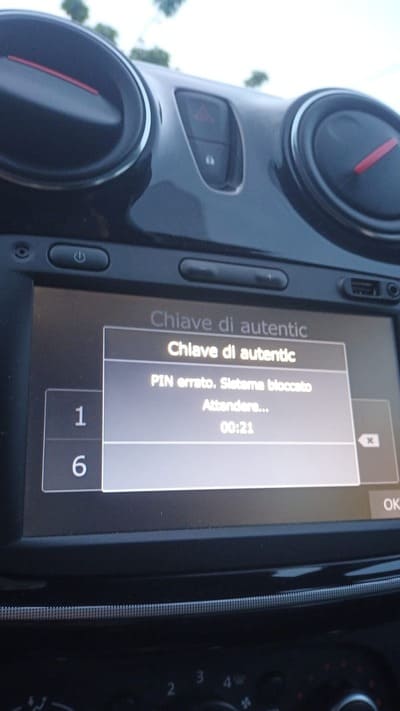
Example of a Renault Captur radio asking for the unlock code after a power loss.
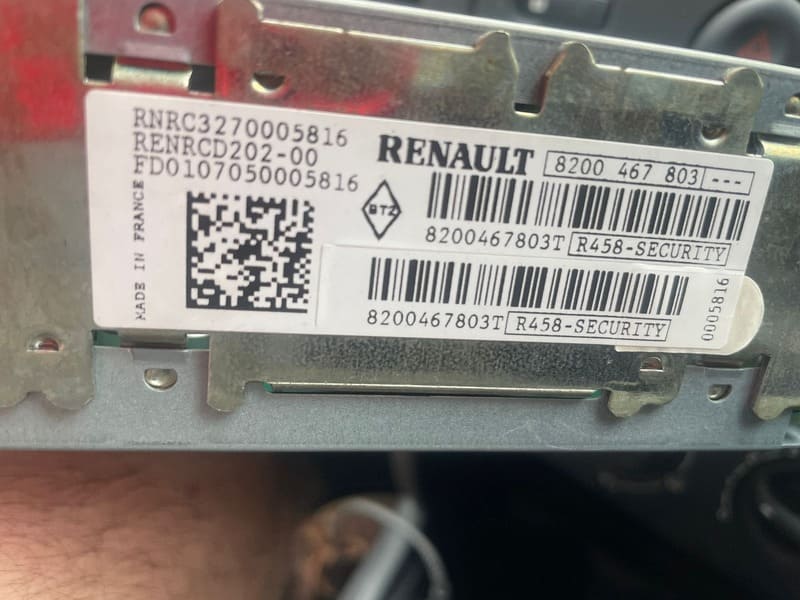
Example of a Renault radio label showing the short security precode.
Check the VIN
Found at the base of the windscreen, on the driver door pillar sticker, or on your V5C registration document.
Removing the radio
Use a trim prying tool to release the outer surround, then a screwdriver to remove the four mounting screws — the whole process takes under 10 minutes.
Check the label
Once removed, look on the back of the unit for a serial number often starting with 2811 — the precode is the letter and three digits at the end.
Why does the Captur radio ask for a code?
Every factory Renault radio is programmed with a unique security code at the point of manufacture. When power is cut — from a disconnected battery, a flat battery, a jump start, or dashboard work — the unit locks itself and asks for that code the next time it’s switched on.
This is a normal anti-theft feature, not a fault. Once the correct code is entered, the radio works again immediately. If the screen shows WAIT after a few wrong attempts, leave the ignition and radio switched on until the timeout clears before trying again — repeated guessing only extends the lockout.
Renault Captur radio code by VIN number
If you’d rather not touch the radio at all, the VIN method is the recommended route for the Captur’s touchscreen unit. A Captur VIN starts with VF1, followed by 14 more characters, e.g. VF15RAJ1H12345678.
Enter the complete 17-character VIN exactly as shown, without spaces. Once it’s verified, the matching radio code is emailed to you — no dashboard panels to remove, no dealer booking required.
The same VIN and security-code lookup covers the wider Renault range too. Visit our Renault Radio Code page for Clio, Megane, Scenic, Kangoo and more.
Common Renault Captur security code examples
Some Captur radios show a short precode on the label instead of using the VIN. This precode is not the final unlock code itself — it identifies the correct code for your specific radio.
A123
Common precode format seen on Captur radio labels.
2811A123
Example of a fuller serial number ending in the precode.
S676
Another typical 4-character precode format.
Captur generations we cover
Our lookup service supports the factory radios fitted across every generation of the Renault Captur.
- Captur I (2013–2019)
- Captur II (2019–present)
- MediaNav
- MediaNav Evolution
- R-Link / R-Link 2
- Update List
- Tuner List
- Factory Renault/Dacia radios
Once you receive your code, press button 1 repeatedly until the first digit shows, then button 2 for the second digit, and so on. Once all four digits are correct, press and hold button 6 for 5–10 seconds until you hear a confirmation beep. This short Renault Dokker demonstration shows the same entry process on a compatible factory unit.
Renault radio code entry example
Why use RadioCodePro?
No dealer visit
Request your Captur radio code online without booking an appointment or waiting at a dealership.
Simple process
Enter your VIN or radio security code, complete the checkout, and receive the result by email.
Support included
Not sure what to enter? Send us a clear photo of the radio label or VIN plate and we’ll check it for you.
Renault Captur radio code FAQ
Can I get my Renault Captur radio code using just the VIN?
Yes. Captur VINs starting with VF1 can usually be matched to the correct radio code without removing the touchscreen unit from the dashboard.
Where do I find the VIN on a Renault Captur?
Check the lower-left corner of the windscreen on the driver’s side, the black sticker on the driver’s door pillar, or your V5C logbook. The VIN is 17 characters long.
What does the Captur radio security code look like?
It’s a 4-character precode, one letter followed by three digits, such as A123. It sits at the end of a longer serial number that often begins with 2811, printed on a label on the back of the radio unit.
Do I need to remove the radio to get the code?
Not if you use the VIN method. If you use the label precode instead, the radio does need to come out, using a trim prying tool and screwdriver to access the four mounting screws.
Does this work for all Captur generations?
Yes. We cover both the original Captur (2013-2019) and the second-generation Captur (2019 onwards), including MediaNav, MediaNav Evolution and R-Link touchscreen systems.
My Captur radio shows WAIT after a wrong code. What should I do?
Leave the ignition and radio switched on until the timeout clears, then enter the correct code carefully using the preset buttons. Repeated guessing can trigger a longer lockout.